
Too Many Achievements
Creator: tropchick · 2026-05-05 · Mods · Free on Eaglercraft Studio
Download Too Many Achievements — free Minecraft mod. Created by tropchick. Tagged achievement, achievementmod, achievements, advancement. Check the file details for Forge, Fabric, or NeoForge before installing.
Creator notes
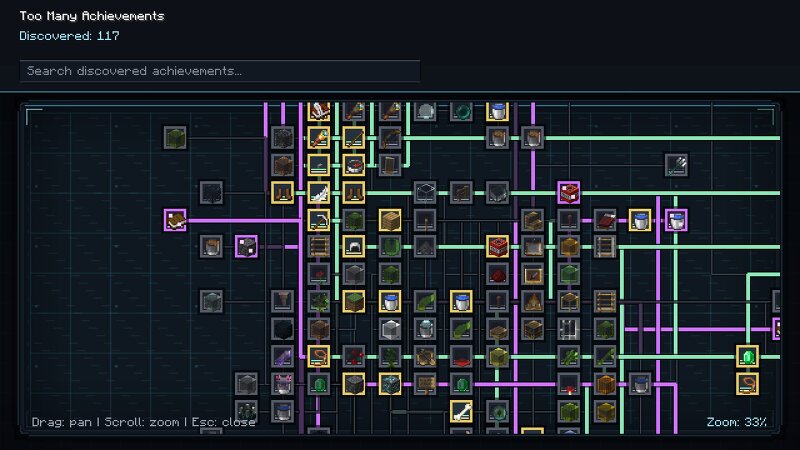
Too Many Achievements Too Many Achievements is a client-side Fabric mod that adds hundreds of funny, strange, awkward, and oddly relatable achievements to Minecraft. This is not a mod about grinding. This is a mod about getting an achievement because you stared at a wall for too long, survived something stupid, acted suspicious around villagers, or looked dramatically into the sky. ✨ What is this mod? Too Many Achievements adds a custom achievement system inspired by vanilla advancements, but focused on humor, player behavior, and weird situations. Instead of asking you to mine 500 blocks or kill 100 mobs, the mod rewards moments that feel alive: doing something awkward almost dying in a dumb way standing somewhere suspiciously watching rain, lava, villagers, or nothing at all accidentally creating a perfect Minecraft moment Make Minecraft notice the ridiculous things players already do. ⚙️ Features 🎯 Core Hundreds of custom achievements Funny, situational, and memorable unlocks No grind-based achievements Secret achievements hidden until unlocked 🖥️ UI & Experience Custom achievement menu Achievement search by name Vanilla-inspired achievement tree Zooming and panning 🔔 Notificati
Added value
What’s included on this page
Preview, categories, compatibility, and tools on this page — not a bare file mirror.
- Creator
- tropchick
- Source
- Minecraft downloads library on Eaglercraft Studio
- Type
- Minecraft mod
- Price
- Free download on Eaglercraft Studio
- Curation
- Listed with credit to tropchick · studio preview & install guide
- Game Version
- Minecraft 1.21.11
- Compatible with
- Minecraft Java (match version / loader in facts)
- Tags
- Achievement, Achievementmod, Achievements, Advancement, Advancementmod, Adventure
Install guide
How to install this free Minecraft mod
Eaglercraft Studio listing with metadata, creator credit, and loader-aware install guidance.
- 1Download the jar/zip when available.
- 2Install the matching loader (Forge, Fabric, or NeoForge) for your Minecraft version.
- 3Drop the mod into your mods folder, then launch with that profile.
Wrong loader or game version usually crashes on startup — read the facts on this page first.
Related free mods
More curated mods from the same library section.

Pastelmooncrafting15 · 67 diamonds · 20 views

PotatoWolfie · 60 diamonds · 2 views

PotatoWolfie · 53 diamonds · 622 views

Janss_33PL · 47 diamonds · 940 views