
TreeForge - Procedural Custom Tree Generator
Creator: Meowbeard · 2026-07-22 · Mods · Free on Eaglercraft Studio
Download TreeForge - Procedural Custom Tree Generator — free Minecraft mod. Created by Meowbeard. Tagged custom trees, minecraft, minecraft trees, procedural. Check the file details for Forge, Fabric, or NeoForge before installing.
Creator notes
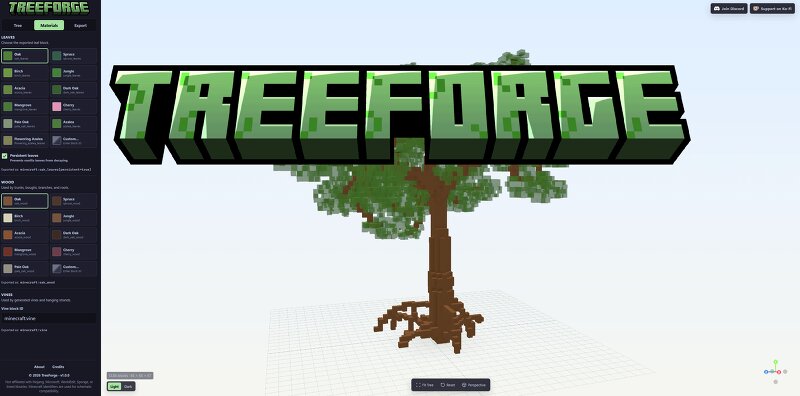
TreeForge is a free browser-based tool for generating customizable Minecraft trees and exporting them as schematic files. No installation or downloads required. Instead of building every tree by hand, you can adjust the generator’s settings and immediately preview the result in 3D. Change the trunk, branches, foliage, size, shape, and other parameters until the tree fits your build. Features Procedurally generated Minecraft trees Interactive 3D preview Adjustable trunk, branch, foliage, and size settings Built-in tree presets Random seed support for creating variations Export generated trees for use in Minecraft Included Tree Types Start with a built-in tree type and customize it into something of your own: Oak Ash Birch Pine Cherry Grove Palm Tree Weeping Willow Spiral Spruce And more to come! Seeds can be randomized to explore new shapes without changing your chosen settings.
Added value
What’s included on this page
Preview, categories, compatibility, and tools on this page — not a bare file mirror.
- Creator
- Meowbeard
- Source
- Minecraft downloads library on Eaglercraft Studio
- Type
- Minecraft mod
- Price
- Free download on Eaglercraft Studio
- Curation
- Listed with credit to Meowbeard · studio preview & install guide
- Game Version
- Minecraft 1.21
- Compatible with
- Minecraft Java (match version / loader in facts)
- Tags
- Custom Trees, Minecraft, Minecraft Trees, Procedural, Program, Schematic
Install guide
How to install this free Minecraft mod
Eaglercraft Studio listing with metadata, creator credit, and loader-aware install guidance.
- 1Download the jar/zip when available.
- 2Install the matching loader (Forge, Fabric, or NeoForge) for your Minecraft version.
- 3Drop the mod into your mods folder, then launch with that profile.
Wrong loader or game version usually crashes on startup — read the facts on this page first.
Related free mods
More curated mods from the same library section.

Pastelmooncrafting15 · 67 diamonds · 20 views

PotatoWolfie · 60 diamonds · 2 views

PotatoWolfie · 53 diamonds · 622 views

Janss_33PL · 47 diamonds · 940 views