
Tridentium
Creator: imyon · 2026-09-17 · Mods · Free on Eaglercraft Studio
Download Tridentium — free Minecraft mod. Created by imyon. Tagged functional, videorendering. Check the file details for Forge, Fabric, or NeoForge before installing.
Creator notes
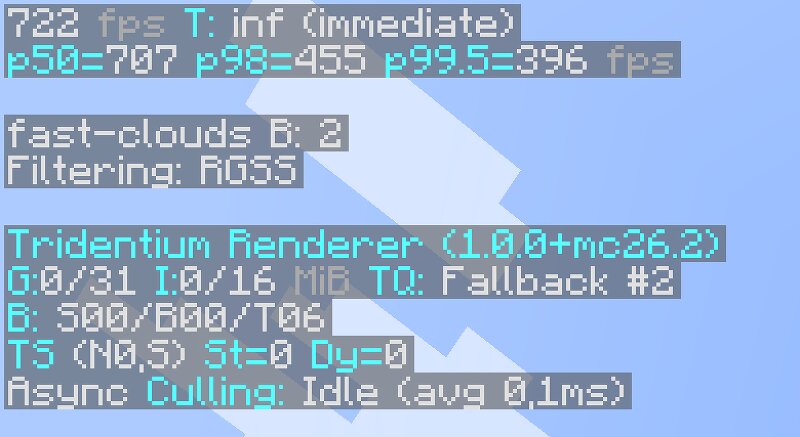
Tridentium is our custom, high-performance optimization mod for Minecraft. Built completely by our team, we have engineered a massive overhaul to the game's rendering engine and packed it with extra quality-of-life features, advanced tweaks, and expanded compatibility right out of the box. Tridentium We made Tridentium because Minecraft can run better than it does. It is a performance and features mod: higher frame rates, less stutter, and a set of tools the game never gave you. Adaptive Render Distance Set a target FPS and forget about it. When the game gets heavy, Tridentium lowers your render distance on its own. When there is headroom again, it brings it right back. A dedicated line on the F3 screen shows you exactly what it is doing in real time. Zoom Hold C to zoom. Rebind it however you like. Post Processing Effects Three effects built in, each toggleable on its own: Bloom, a soft glow around bright areas Color Grading, to set the tone of the whole scene Motion Blur, to smooth fast camera movement Effects only run while you are in a world. If one ever fails, it disables itself quietly instead of taking the game down. Profiles Potato, Balanced, Beast. One click each. Save you
Added value
What’s included on this page
Preview, categories, compatibility, and tools on this page — not a bare file mirror.
- Creator
- imyon
- Source
- Minecraft downloads library on Eaglercraft Studio
- Type
- Minecraft mod
- Price
- Free download on Eaglercraft Studio
- Curation
- Listed with credit to imyon · studio preview & install guide
- Game Version
- Minecraft 26.2
- Compatible with
- Minecraft Java (match version / loader in facts)
- Tags
- Functional, Videorendering
Install guide
How to install this free Minecraft mod
Eaglercraft Studio listing with metadata, creator credit, and loader-aware install guidance.
- 1Download the jar/zip when available.
- 2Install the matching loader (Forge, Fabric, or NeoForge) for your Minecraft version.
- 3Drop the mod into your mods folder, then launch with that profile.
Wrong loader or game version usually crashes on startup — read the facts on this page first.
Related free mods
More curated mods from the same library section.

Pastelmooncrafting15 · 67 diamonds · 20 views

PotatoWolfie · 60 diamonds · 2 views

PotatoWolfie · 53 diamonds · 622 views

Janss_33PL · 47 diamonds · 940 views