
True Scale Mobs
Creator: SlimeeyYt · 2026-03-30 · Mods · Free on Eaglercraft Studio
Download True Scale Mobs — free Minecraft mod. Created by SlimeeyYt. Tagged minecraft, mods, new content. Check the file details for Forge, Fabric, or NeoForge before installing.
Creator notes
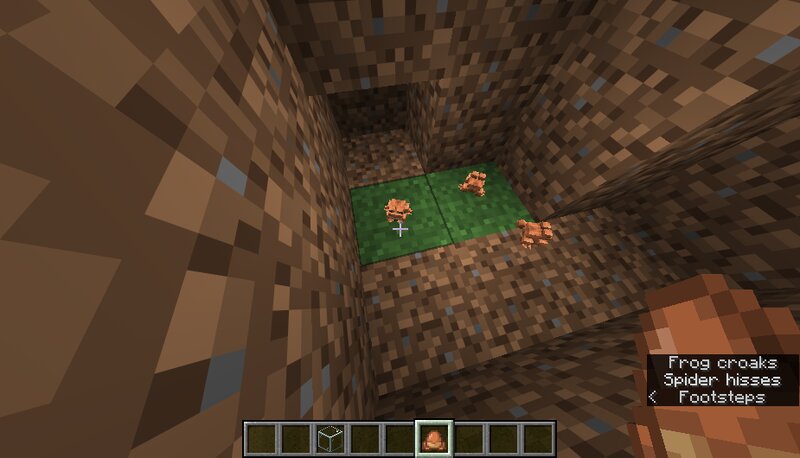
MicroMobs is a lightweight Fabric mod that adjusts the size of many mobs to better reflect their real-world biological proportions. In vanilla Minecraft, many creatures are intentionally oversized for gameplay reasons. Spiders are huge, bees are large, and silverfish are much bigger than their real-world counterparts. also tadpole are made smaller MicroMobs changes that. This mod rescales many mobs so that insects become tiny, small animals feel more natural, and large creatures remain imposing, creating a more immersive ecosystem while keeping gameplay balanced. Features Realistic Mob Scaling Rescales many mobs to closer real-world proportions while keeping gameplay balanced. Attribute-Based Scaling Uses Minecraft's GENERIC_SCALE attribute to scale entity models, hitboxes, eye height, and shadows in a single system. Balanced Mob Categories Tiny insects (Silverfish, Endermite) scaled to ~10% Small insects (Bees) scaled to ~18% Arthropods (Spiders) scaled to ~22–25% Amphibians (Frogs) scaled to ~35% Small animals (Rabbits, Cats, Foxes) scaled to ~60–75% Medium animals (Pigs, Sheep, Wolves, Cows) scaled to ~90–95% Unchanged Bosses & Major Mobs Large mobs like Iron Golems, Wardens, an
Added value
What’s included on this page
Preview, categories, compatibility, and tools on this page — not a bare file mirror.
- Creator
- SlimeeyYt
- Source
- Minecraft downloads library on Eaglercraft Studio
- Type
- Minecraft mod
- Price
- Free download on Eaglercraft Studio
- Curation
- Listed with credit to SlimeeyYt · studio preview & install guide
- Game Version
- Minecraft 1.21.11
- Compatible with
- Minecraft Java (match version / loader in facts)
- Tags
- Minecraft, Mods, New Content
Install guide
How to install this free Minecraft mod
Eaglercraft Studio listing with metadata, creator credit, and loader-aware install guidance.
- 1Download the jar/zip when available.
- 2Install the matching loader (Forge, Fabric, or NeoForge) for your Minecraft version.
- 3Drop the mod into your mods folder, then launch with that profile.
Wrong loader or game version usually crashes on startup — read the facts on this page first.
Related free mods
More curated mods from the same library section.

Pastelmooncrafting15 · 67 diamonds · 20 views

PotatoWolfie · 60 diamonds · 2 views

PotatoWolfie · 53 diamonds · 622 views

Janss_33PL · 47 diamonds · 940 views