
Ukrainian Flags
Creator: kot2154 · 2026-07-23 · Mods · Free on Eaglercraft Studio
Download Ukrainian Flags — free Minecraft mod. Created by kot2154. Tagged banners, crimea, donetsk, flags. Check the file details for Forge, Fabric, or NeoForge before installing.
Creator notes
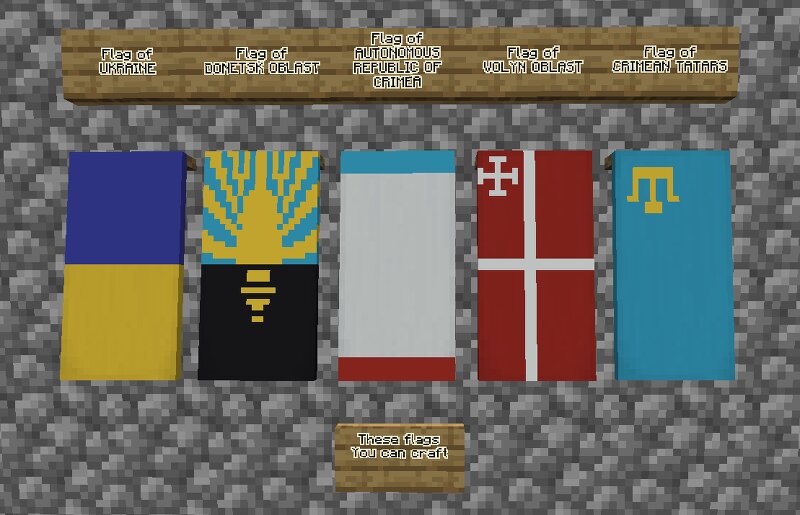
🇬🇧 - Description of the mod VERSION: FORGE 1.20.1 Hello! As you’ve probably guessed, this mod adds banner patterns for creating Ukrainian flags of oblasts (regions) and cities. As of the time of writing this description (22.07.26), the design for the Donetsk Oblast flag , Autonomous Republic of Crimea flag (with with the flag of the Crimean Tatars) and Volyn Oblast flag is ready! (As well as translation into English and Ukrainian ) There are plans to add the banner patterns of all the remaining oblasts in the near future, and in the distant future, I plan to add banner patterns for regional centers as well. Also I plan to add a translation into Belarusian and Russian. This mod was created solely for entertainment and other positive purposes, excluding political or military ones. The author does not support any form of aggression You can see how to craft banner patterns in the gallery. 🇺🇦 - Опис моду ВЕРСІЯ: FORGE 1.20.1 Привіт! Як ви, мабуть, здогадалися, цей мод додає візерунки стягів для створення українських прапорів областей та міст. Станом на момент написання цього опису (22.07.26) прапор Донецької області , прапор АР Крим (з кримськотатарським прапором) та прапор Волинської
Added value
What’s included on this page
Preview, categories, compatibility, and tools on this page — not a bare file mirror.
- Creator
- kot2154
- Source
- Minecraft downloads library on Eaglercraft Studio
- Type
- Minecraft mod
- Price
- Free download on Eaglercraft Studio
- Curation
- Listed with credit to kot2154 · studio preview & install guide
- Game Version
- Minecraft 1.20.1
- Compatible with
- Minecraft Java (match version / loader in facts)
- Tags
- Banners, Crimea, Donetsk, Flags, Lviv, New Content
Install guide
How to install this free Minecraft mod
Eaglercraft Studio listing with metadata, creator credit, and loader-aware install guidance.
- 1Download the jar/zip when available.
- 2Install the matching loader (Forge, Fabric, or NeoForge) for your Minecraft version.
- 3Drop the mod into your mods folder, then launch with that profile.
Wrong loader or game version usually crashes on startup — read the facts on this page first.
Related free mods
More curated mods from the same library section.

Pastelmooncrafting15 · 67 diamonds · 20 views

PotatoWolfie · 60 diamonds · 2 views

PotatoWolfie · 53 diamonds · 622 views

Janss_33PL · 47 diamonds · 940 views