
Update Beacon
Creator: FinnDog_123 · 2026-09-28 · Mods · Free on Eaglercraft Studio
Download Update Beacon — free Minecraft mod. Created by FinnDog_123. Tagged fabric, functional, management, neoforge. Check the file details for Forge, Fabric, or NeoForge before installing.
Creator notes
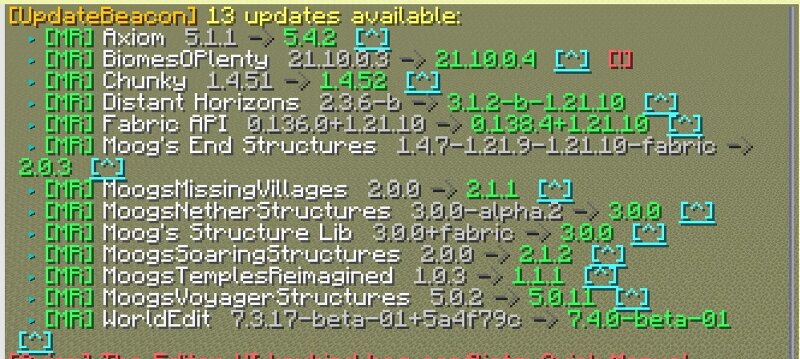
UpdateBeacon A server-side Minecraft mod that automatically checks for updates to your installed mods on Modrinth and CurseForge , then notifies your operators — and can download and apply the updates for you. No client installation required. Features Update detection Checks every installed mod against both Modrinth and CurseForge (CurseForge is enabled by adding a free API key). Hash-based matching — compares the SHA-512 of each installed jar against Modrinth's file records (and CurseForge fingerprints), eliminating false positives from version-string quirks (e.g. 1.4.147 vs 1.4.147+v240613 ). Nested and bundled sub-mods are skipped automatically. Per-mod update channels — track release , beta , or alpha independently for each mod. Pins — freeze a mod at its current version to silence update notices until you unpin it. Notifications Console — logs available updates on every check. In-game chat — colored output with clickable download links, sent to eligible ops. Player login — ops see any pending updates when they join. Webhooks — post to any number of endpoints at once (see below). Downloads & applying Download pending updates to a staging area with hash verification against the
Added value
What’s included on this page
Preview, categories, compatibility, and tools on this page — not a bare file mirror.
- Creator
- FinnDog_123
- Source
- Minecraft downloads library on Eaglercraft Studio
- Type
- Minecraft mod
- Price
- Free download on Eaglercraft Studio
- Curation
- Listed with credit to FinnDog_123 · studio preview & install guide
- Game Version
- Minecraft 26.2
- Compatible with
- Minecraft Java (match version / loader in facts)
- Tags
- Fabric, Functional, Management, Neoforge, Notifications, Server
Install guide
How to install this free Minecraft mod
Eaglercraft Studio listing with metadata, creator credit, and loader-aware install guidance.
- 1Download the jar/zip when available.
- 2Install the matching loader (Forge, Fabric, or NeoForge) for your Minecraft version.
- 3Drop the mod into your mods folder, then launch with that profile.
Wrong loader or game version usually crashes on startup — read the facts on this page first.
Related free mods
More curated mods from the same library section.

Pastelmooncrafting15 · 67 diamonds · 20 views

PotatoWolfie · 60 diamonds · 2 views

PotatoWolfie · 53 diamonds · 622 views

Janss_33PL · 47 diamonds · 940 views