
UpRanks V2 1.21.132+
Creator: Mannooma · 2026-01-18 · Mods · Free on Eaglercraft Studio
Download UpRanks V2 1.21.132+ — free Minecraft mod. Created by Mannooma. Tagged addons, functional, mcpe, minecraftbedrockaddons. Check the file details for Forge, Fabric, or NeoForge before installing.
Creator notes
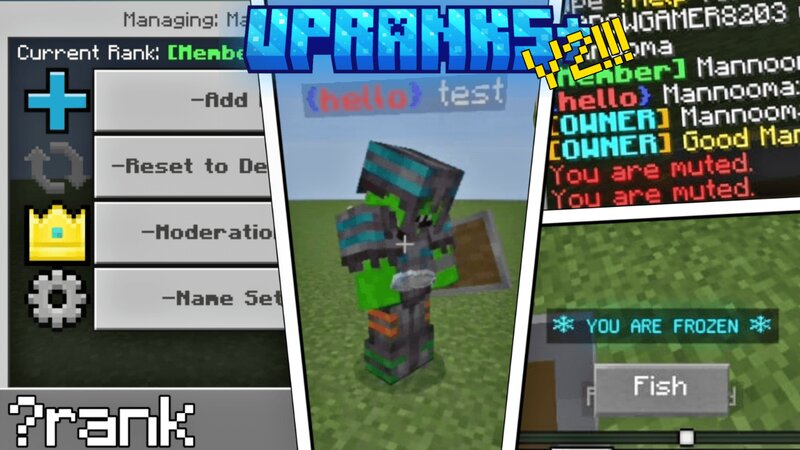
Introduction UpRanks Addon enhances the Minecraft experience by providing administrators with powerful tools to manage player ranks and name colors. With this addon, you can easily add, edit, and clear ranks for players, customize name and message colors, and apply various formatting styles such as bold, italic, and underline. The addon supports a wide range of colors and formatting codes, allowing for detailed customization to suit your server's needs . Credits This addon is made by @Mannooma_0 If you wish to record about this addon pls mention my channel and put this addon link Add-On Showcase Experiments Before adding the addon make sure to enable beta-api to run the addon smoothly How To Use Main Menu If you try to open the menu with no admin tag you will not be able to open the menu Add an admin tag to be able to open up ranks menu /tag @s add admin then type ?rank in chat in order to open the menu exit the chat and wait 3 seconds and menu will open Manage Ranks You can create/delete ranks and be able to change default rank Creating New Rank you can type name and style of the rank and brackets Changing Default Rank choose from the dropdown the rank you want it
Added value
What’s included on this page
Preview, categories, compatibility, and tools on this page — not a bare file mirror.
- Creator
- Mannooma
- Source
- Minecraft downloads library on Eaglercraft Studio
- Type
- Minecraft mod
- Price
- Free download on Eaglercraft Studio
- Curation
- Listed with credit to Mannooma · studio preview & install guide
- Game Version
- Minecraft 1.21.11
- Compatible with
- Minecraft Java (match version / loader in facts)
- Tags
- Addons, Functional, Mcpe, Minecraftbedrockaddons, Rank, Ranks
Install guide
How to install this free Minecraft mod
Eaglercraft Studio listing with metadata, creator credit, and loader-aware install guidance.
- 1Download the jar/zip when available.
- 2Install the matching loader (Forge, Fabric, or NeoForge) for your Minecraft version.
- 3Drop the mod into your mods folder, then launch with that profile.
Wrong loader or game version usually crashes on startup — read the facts on this page first.
Related free mods
More curated mods from the same library section.

Pastelmooncrafting15 · 67 diamonds · 20 views

PotatoWolfie · 60 diamonds · 2 views

PotatoWolfie · 53 diamonds · 622 views

Janss_33PL · 47 diamonds · 940 views