
UrdaVarg Energy Tier1
Creator: Svabergindianer · 2026-07-31 · Mods · Free on Eaglercraft Studio
Download UrdaVarg Energy Tier1 — free Minecraft mod. Created by Svabergindianer. Tagged functional. Check the file details for Forge, Fabric, or NeoForge before installing.
Creator notes
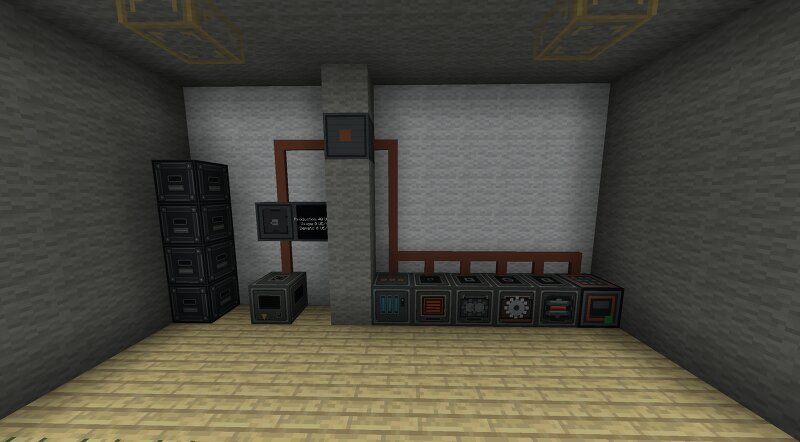
UrdaVarg Energy Tier1a UrdaVarg Energy is a Survival-focused power and industry mod built around visible infrastructure, practical machines, and expandable production systems. Tier 1 introduces the foundation of the UrdaVarg power network. Generate electricity from coal, store it in batteries, distribute it through cables, and use it to operate machines, workshops, lighting, and powered construction equipment. POWER NETWORK Electricity is generated by the Coal Generator and can be stored in Batteries. Machines are connected through a visible cable network using Connectors, Surface Cables, Transition Blocks, Power Repeaters, and Power Boxes. The Power Box is the main control point for a circuit. It can switch connected machines and equipment on or off without dismantling the network. Surface Cable has a limited transmission range. Power Repeaters extend longer networks, while Transition Blocks provide clean connections through walls, floors, ceilings, and difficult corners. TIER 1 MACHINES • Coal Generator Produces UE from coal-based fuel. • Battery Stores generated energy and preserves its charge when broken and moved. • Electric Smelter Processes normal furnace materials using ele
Added value
What’s included on this page
Preview, categories, compatibility, and tools on this page — not a bare file mirror.
- Creator
- Svabergindianer
- Source
- Minecraft downloads library on Eaglercraft Studio
- Type
- Minecraft mod
- Price
- Free download on Eaglercraft Studio
- Curation
- Listed with credit to Svabergindianer · studio preview & install guide
- Game Version
- Minecraft 1.20.4
- Compatible with
- Minecraft Java (match version / loader in facts)
- Tags
- Functional
Install guide
How to install this free Minecraft mod
Eaglercraft Studio listing with metadata, creator credit, and loader-aware install guidance.
- 1Download the jar/zip when available.
- 2Install the matching loader (Forge, Fabric, or NeoForge) for your Minecraft version.
- 3Drop the mod into your mods folder, then launch with that profile.
Wrong loader or game version usually crashes on startup — read the facts on this page first.
Related free mods
More curated mods from the same library section.

Pastelmooncrafting15 · 67 diamonds · 20 views

PotatoWolfie · 60 diamonds · 2 views

PotatoWolfie · 53 diamonds · 622 views

Janss_33PL · 47 diamonds · 940 views