
UrdaVargs Autolight
Creator: Svabergindianer · 2026-07-28 · Mods · Free on Eaglercraft Studio
Download UrdaVargs Autolight — free Minecraft mod. Created by Svabergindianer. Tagged aesthetic, architectural, autolighting, building. Check the file details for Forge, Fabric, or NeoForge before installing.
Creator notes
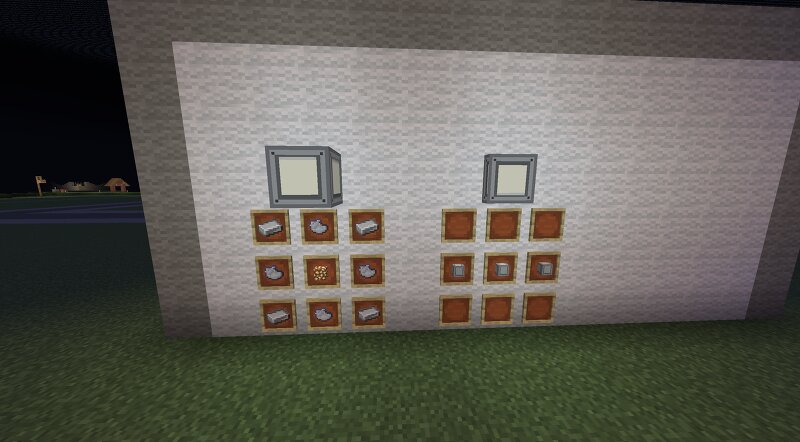
UrdaVarg AutoLight adds two different lighting systems for Minecraft: automatic lighting and energy-controlled industrial lighting. AutoLight Glass Blocks and AutoLight Glass Slabs react to the surrounding light level. They automatically turn on when the area becomes dark and switch off again when there is enough daylight or other light nearby. They are suitable for roads, paths, buildings, farms, tunnels, and outdoor areas. The Glowtorch provides a simple light source that remains permanently lit. Industrial Light Blocks and Industrial Light Slabs are designed for factories, workshops, tunnels, technical rooms, and other industrial builds. Unlike the automatic lights, Industrial Lights do not react to daylight. They are controlled by UrdaVarg Energy. An Industrial Light turns on when it is placed directly against a powered Transition Block. When power to the Transition Block is removed, the Industrial Light turns off. The lights can be placed on different sides of the Transition Block, allowing them to be used on floors, walls, and ceilings. Industrial Lights currently do not consume UE and therefore do not increase Usage or Demand. They still require a powered UrdaVarg Energy con
Added value
What’s included on this page
Preview, categories, compatibility, and tools on this page — not a bare file mirror.
- Creator
- Svabergindianer
- Source
- Minecraft downloads library on Eaglercraft Studio
- Type
- Minecraft mod
- Price
- Free download on Eaglercraft Studio
- Curation
- Listed with credit to Svabergindianer · studio preview & install guide
- Game Version
- Minecraft 1.20.4
- Compatible with
- Minecraft Java (match version / loader in facts)
- Tags
- Aesthetic, Architectural, Autolighting, Building, Decoration, Fabric
Install guide
How to install this free Minecraft mod
Eaglercraft Studio listing with metadata, creator credit, and loader-aware install guidance.
- 1Download the jar/zip when available.
- 2Install the matching loader (Forge, Fabric, or NeoForge) for your Minecraft version.
- 3Drop the mod into your mods folder, then launch with that profile.
Wrong loader or game version usually crashes on startup — read the facts on this page first.
Related free mods
More curated mods from the same library section.

Pastelmooncrafting15 · 67 diamonds · 20 views

PotatoWolfie · 60 diamonds · 2 views

PotatoWolfie · 53 diamonds · 622 views

Janss_33PL · 47 diamonds · 940 views