
Vanilla Enhanced
Creator: xsoras · 2026-05-20 · Mods · Free on Eaglercraft Studio
Download Vanilla Enhanced — free Minecraft mod. Created by xsoras. Tagged 140k, aaa, aesthetic, basic. Check the file details for Forge, Fabric, or NeoForge before installing.
Creator notes
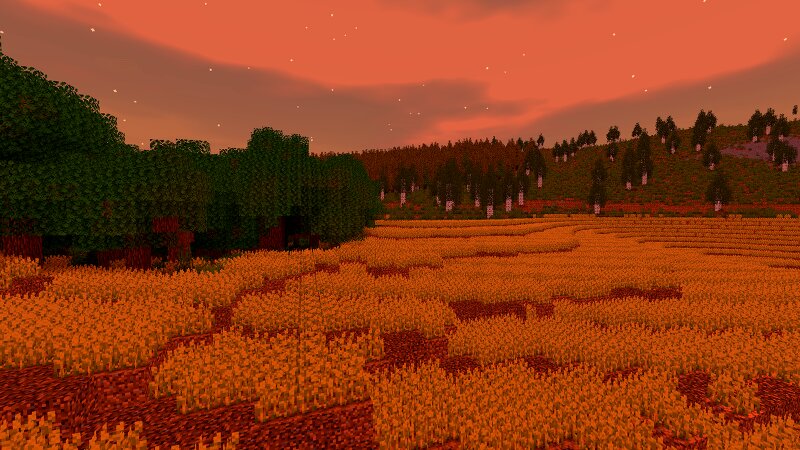
Bored of plain Minecraft? This will change everything. Support the project on Patreon → Vanilla Enhanced — Minecraft, but better. Vanilla Enhanced is a lightweight shaderpack made to elevate the way Minecraft feels — not to remake it. Cleaner light, richer color, and subtle motion make your world more immersive while keeping the classic look you love. What you’ll notice right away More presence: Light and shadow add depth so environments feel tangible. Natural movement: Leaves, water, and reflections react smoothly to motion. Focused polish: Small details (grass, stones, torchlight) gain subtle realism. No compromise: Optimized to run well on modest systems. Highlights in action Golden skies that sell the scene. Sunsets become a moment worth pausing for — gentle gradients, richer highlights, memorable horizons. 🧠 Lamapi: Next-Gen Open Source AI Pushing the boundaries of accessible intelligence. Whether you need lightweight efficiency or industrial-grade reasoning, the Next Series delivers. Why build with Lamapi? ⚡ High Efficiency: From compact 1B models to powerful 70B reasoning engines. 🌍 Multilingual Mastery: Optimized for superior performance in English & Turkish. 🛠️ Ready t
Added value
What’s included on this page
Preview, categories, compatibility, and tools on this page — not a bare file mirror.
- Creator
- xsoras
- Source
- Minecraft downloads library on Eaglercraft Studio
- Type
- Minecraft mod
- Price
- Free download on Eaglercraft Studio
- Curation
- Listed with credit to xsoras · studio preview & install guide
- Game Version
- Minecraft 26.1.2
- Compatible with
- Minecraft Java (match version / loader in facts)
- Tags
- 140k, Aaa, Aesthetic, Basic, Curseforge, Enhanced
Install guide
How to install this free Minecraft mod
Eaglercraft Studio listing with metadata, creator credit, and loader-aware install guidance.
- 1Download the jar/zip when available.
- 2Install the matching loader (Forge, Fabric, or NeoForge) for your Minecraft version.
- 3Drop the mod into your mods folder, then launch with that profile.
Wrong loader or game version usually crashes on startup — read the facts on this page first.
Related free mods
More curated mods from the same library section.

Pastelmooncrafting15 · 67 diamonds · 20 views

PotatoWolfie · 60 diamonds · 2 views

PotatoWolfie · 53 diamonds · 622 views

Janss_33PL · 47 diamonds · 940 views