
Verity Minecraft bedrock edition Version 2
Creator: Sergey7363635 · 2026-09-13 · Mods · Free on Eaglercraft Studio
Download Verity Minecraft bedrock edition Version 2 — free Minecraft mod. Created by Sergey7363635. Tagged creepy, horror, new content, verity. Check the file details for Forge, Fabric, or NeoForge before installing.
Creator notes
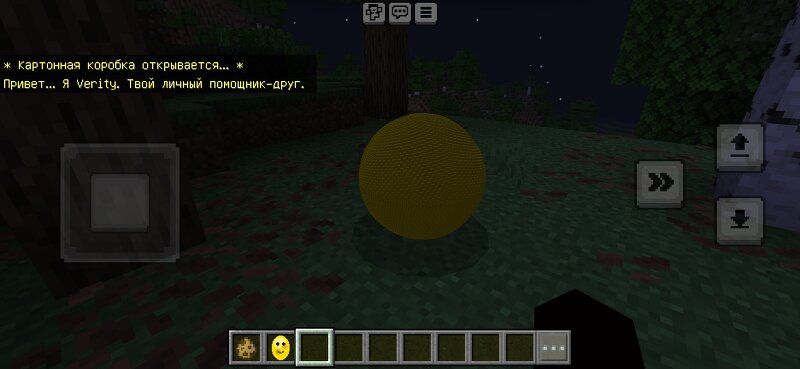
Verity — Minecraft Bedrock AddonVerity is your personal helper friend — a yellow sphere companion that arrives in a cardboard box.FeaturesA mysterious cardboard box appears when you create or first join a worldOpen the box to release VerityInteractive menu (right-click Verity)Chat with text input — type messages and get replies700+ phrases and keyword responses (English & Russian)Follow / stop following the playerPick up Verity as a Verity Egg, place it, or sneak + use to throw (bounces off blocks)Flashlight item (night vision while held)Language switcher in the menuVerity Anomaly — a hostile form that can appear near villages and attack players and villagersPack icon and full resource pack (models & textures)How to useEnable Beta APIs in world experimentsActivate Verity (Behavior) + Verity ResourcesJoin the world — the box spawns nearbyRight-click the box → Verity appearsRight-click Verity for menu, chat, follow, pick up, languageCommands/summon verity:verity — spawn Verity/summon verity:box — spawn the box/summon verity:monster — spawn the Anomaly/give @s verity:flashlight — flashlight/give @s verity:verity_held — Verity EggRequirementsMinecraft Bedrock 1.20.50+Beta APIs experime
Added value
What’s included on this page
Preview, categories, compatibility, and tools on this page — not a bare file mirror.
- Creator
- Sergey7363635
- Source
- Minecraft downloads library on Eaglercraft Studio
- Type
- Minecraft mod
- Price
- Free download on Eaglercraft Studio
- Curation
- Listed with credit to Sergey7363635 · studio preview & install guide
- Game Version
- Minecraft 26.3 snapshot
- Compatible with
- Minecraft Java (match version / loader in facts)
- Tags
- Creepy, Horror, New Content, Verity
Install guide
How to install this free Minecraft mod
Eaglercraft Studio listing with metadata, creator credit, and loader-aware install guidance.
- 1Download the jar/zip when available.
- 2Install the matching loader (Forge, Fabric, or NeoForge) for your Minecraft version.
- 3Drop the mod into your mods folder, then launch with that profile.
Wrong loader or game version usually crashes on startup — read the facts on this page first.
Related free mods
More curated mods from the same library section.

Pastelmooncrafting15 · 67 diamonds · 20 views

PotatoWolfie · 60 diamonds · 2 views

PotatoWolfie · 53 diamonds · 622 views

Janss_33PL · 47 diamonds · 940 views