
🚶 WALK = RANDOM ITEM (Fabric-Mod 1.21.11)
Creator: Heykikoo · 2026-03-23 · Mods · Free on Eaglercraft Studio
Download 🚶 WALK = RANDOM ITEM (Fabric-Mod 1.21.11) — free Minecraft mod. Created by Heykikoo. Tagged challenge, fabric, functional, luck. Check the file details for Forge, Fabric, or NeoForge before installing.
Creator notes
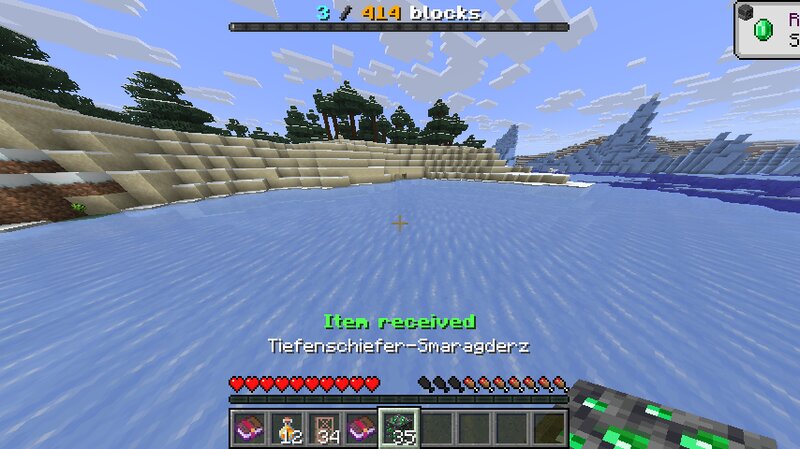
🚶 WALK = RANDOM ITEM 🔥 A Movement-Based Randomizer Challenge WALK = RANDOM ITEM is a Fabric mod for Minecraft 1.21.11. This mod completely changes how you obtain items. Instead of relying on block drops, your movement becomes the key to progression. ⚙️ Requirements Minecraft 1.21.11 Fabric Loader 0.18.2 Fabric API 0.140.2+1.21.11 🎮 Gameplay Normal world block drops are disabled. You can still break blocks, but natural world blocks do not drop their usual items. Mob drops are still enabled. The challenge does not start automatically. You activate it manually in-game using a command. Once active, walking will reward you with random items. A live boss bar shows your current progress. Every reward target is random, ranging from 1 to 500 blocks. When you reach your goal, you hear a sound and receive a random item directly into your inventory. Stackable items can be rewarded in random stack sizes. Non-stackable items are always given as single items. Progress and current targets are saved per world. 🌍 Multiplayer The mod fully supports multiplayer. The challenge itself is enabled or disabled for the entire world. Each player has their own individual progress and their own random distance
Added value
What’s included on this page
Preview, categories, compatibility, and tools on this page — not a bare file mirror.
- Creator
- Heykikoo
- Source
- Minecraft downloads library on Eaglercraft Studio
- Type
- Minecraft mod
- Price
- Free download on Eaglercraft Studio
- Curation
- Listed with credit to Heykikoo · studio preview & install guide
- Game Version
- Minecraft 1.21.11
- Compatible with
- Minecraft Java (match version / loader in facts)
- Tags
- Challenge, Fabric, Functional, Luck, Mod, Multiplayer
Install guide
How to install this free Minecraft mod
Eaglercraft Studio listing with metadata, creator credit, and loader-aware install guidance.
- 1Download the jar/zip when available.
- 2Install the matching loader (Forge, Fabric, or NeoForge) for your Minecraft version.
- 3Drop the mod into your mods folder, then launch with that profile.
Wrong loader or game version usually crashes on startup — read the facts on this page first.
Related free mods
More curated mods from the same library section.

Pastelmooncrafting15 · 67 diamonds · 20 views

PotatoWolfie · 60 diamonds · 2 views

PotatoWolfie · 53 diamonds · 622 views

Janss_33PL · 47 diamonds · 940 views