
Wallet
Creator: R0gaL · 2026-08-16 · Mods · Free on Eaglercraft Studio
Download Wallet — free Minecraft mod. Created by R0gaL. Tagged adventure, coins, currency, economy. Check the file details for Forge, Fabric, or NeoForge before installing.
Creator notes
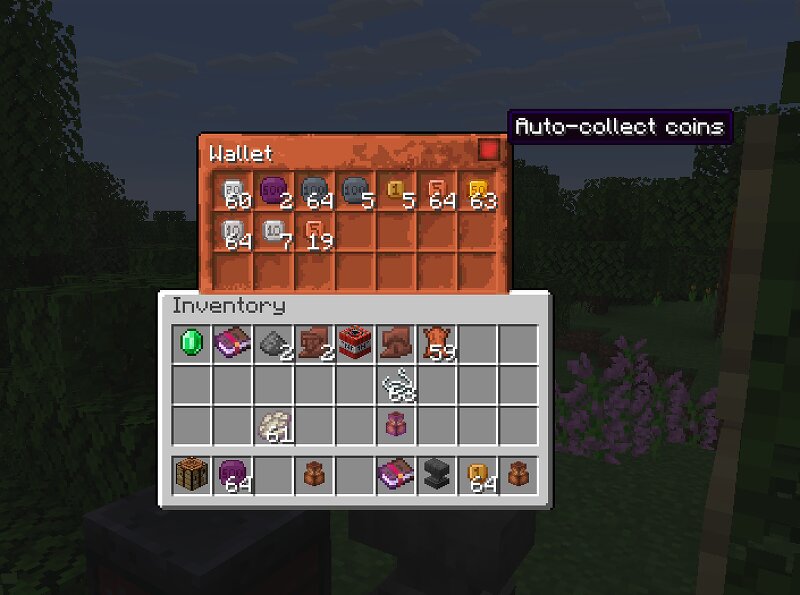
Wallet Immerse yourself in the world of Minecraft economics with Wallet . Currency comes to the game as seven coin denominations — 1, 5, 10, 20, 50, 100, and 500 — found in village, dungeon, and structure loot, stored in a dedicated Coin Sack, and exchanged at a crafting table. Originally a datapack, now rebuilt from scratch as a mod for Fabric and NeoForge . Minecraft 26.2 · requires Architectury API and, on Fabric, Fabric API Features Seven unique coins Each coin has its own design and denomination, making transactions easy to read at a glance. The Coin Sack A 21-slot container that only accepts coins, shows a running total of everything inside, and can auto-pick up any coin you walk over. Coin exchange Coins convert in both directions at any crafting table — consolidate small change, or break a large coin down for exact payments. Combine Result 5 × 1 5 2 × 5 10 2 × 10 20 5 × 10 50 2 × 20 + 1 × 10 50 5 × 20 2 × 50 2 × 50 100 5 × 100 500 Enchantments Owner Binding — locks a sack to its owner; nobody else can open it. Loot-only, found in hostile structures. Wallet Guardian I–V — your sack survives death, losing one level each time. The last level turns into Fragility. Fragility — o
Added value
What’s included on this page
Preview, categories, compatibility, and tools on this page — not a bare file mirror.
- Creator
- R0gaL
- Source
- Minecraft downloads library on Eaglercraft Studio
- Type
- Minecraft mod
- Price
- Free download on Eaglercraft Studio
- Curation
- Listed with credit to R0gaL · studio preview & install guide
- Game Version
- Minecraft 26.2
- Compatible with
- Minecraft Java (match version / loader in facts)
- Tags
- Adventure, Coins, Currency, Economy, Fabric, Functional
Install guide
How to install this free Minecraft mod
Eaglercraft Studio listing with metadata, creator credit, and loader-aware install guidance.
- 1Download the jar/zip when available.
- 2Install the matching loader (Forge, Fabric, or NeoForge) for your Minecraft version.
- 3Drop the mod into your mods folder, then launch with that profile.
Wrong loader or game version usually crashes on startup — read the facts on this page first.
Related free mods
More curated mods from the same library section.

Pastelmooncrafting15 · 67 diamonds · 20 views

PotatoWolfie · 60 diamonds · 2 views

PotatoWolfie · 53 diamonds · 622 views

Janss_33PL · 47 diamonds · 940 views