
Watch Me Dead
Creator: Aquarius_playz · 2026-05-29 · Mods · Free on Eaglercraft Studio
Download Watch Me Dead — free Minecraft mod. Created by Aquarius_playz. Tagged functional. Check the file details for Forge, Fabric, or NeoForge before installing.
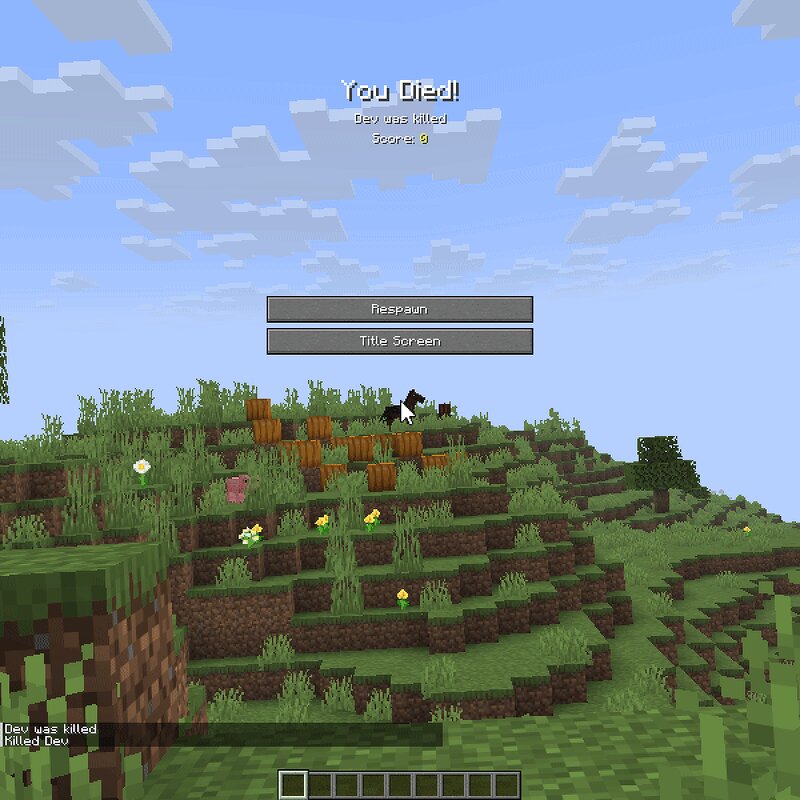
Creator notes
Aquarius Libs needs to be installed for this mod to work! This client-side mod allows you to look around freely with your mouse on the death screen while holding alt and removes the red background overlay by default. What it does Automatic Rotation: The camera slowly rotates around your body automatically instead of staying frozen in place Hold Alt to Look Around (Free Look): Holding the Left Alt key pauses the automatic rotation, allowing you to manually look around using your mouse. This action also completely hides all menu buttons for an unblocked view. Dynamic Zoom Controls: You can scroll your mouse wheel to zoom in and out. To keep your viewing angles steady, the camera's rotation speed slows down automatically the further you zoom in. No Disappearing Mobs: Nearby monsters and creatures stay visible on your screen instead of vanishing. They won't move around though. Removed Red Background: The standard reddish death screen overlay is totally gone, giving you a normal, clear view of the world. Config option: red background visibility, hide entities after death, auto rotate speed, mouse free-look speed, zoom smoothness. Supported Versions Loaders: Forge, Fabric, and NeoForge.
Added value
What’s included on this page
Preview, categories, compatibility, and tools on this page — not a bare file mirror.
- Creator
- Aquarius_playz
- Source
- Minecraft downloads library on Eaglercraft Studio
- Type
- Minecraft mod
- Price
- Free download on Eaglercraft Studio
- Curation
- Listed with credit to Aquarius_playz · studio preview & install guide
- Game Version
- Minecraft 26.1.2
- Compatible with
- Minecraft Java (match version / loader in facts)
- Tags
- Functional
Install guide
How to install this free Minecraft mod
Eaglercraft Studio listing with metadata, creator credit, and loader-aware install guidance.
- 1Download the jar/zip when available.
- 2Install the matching loader (Forge, Fabric, or NeoForge) for your Minecraft version.
- 3Drop the mod into your mods folder, then launch with that profile.
Wrong loader or game version usually crashes on startup — read the facts on this page first.
Related free mods
More curated mods from the same library section.

Pastelmooncrafting15 · 67 diamonds · 20 views

PotatoWolfie · 60 diamonds · 2 views

PotatoWolfie · 53 diamonds · 622 views

Janss_33PL · 47 diamonds · 940 views