
Way too many binds
Creator: Ancar · 2026-09-08 · Mods · Free on Eaglercraft Studio
Download Way too many binds — free Minecraft mod. Created by Ancar. Tagged binds, other, search, toomany. Check the file details for Forge, Fabric, or NeoForge before installing.
Creator notes
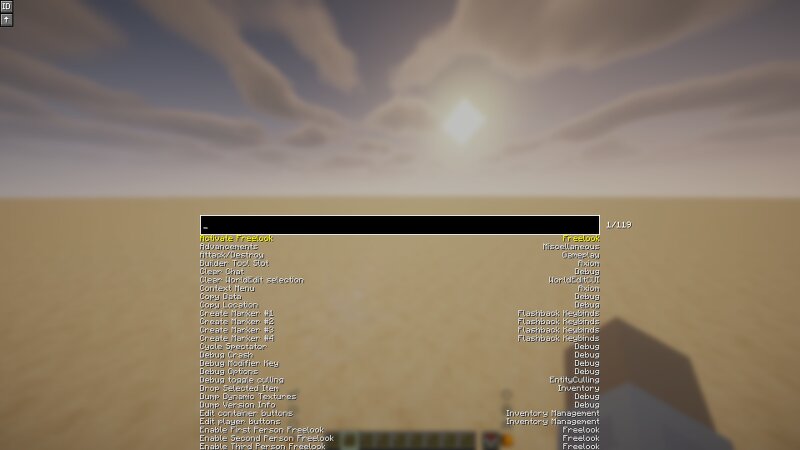
Way Too Many Binds Search your keybinds by name and press them from a search box, instead of hunting through the controls menu. Once you have enough mods installed, the controls menu turns into a scroll marathon and every convenient key is already taken. This mod gives you one key that opens a search box: type part of a keybind's name, press Enter, and it fires the bind for you. Handy for anything you use too rarely to justify a key of its own. Usage Search Keybinds Default: Enter What it does: Opens the search screen Reload Config Default: unbound What it does: Re-reads the config file without restarting Inside the search screen: Type — Filter the list Up / Down, scroll wheel — Move the selection Tab — Move down one entry Enter, or click an entry — Press the selected bind and close Escape — Close without pressing anything The search matches a bind's name and category, and their translation keys too, so key.inventory finds the same entry as Open/Close Inventory . Two toggles sit in the top-left corner of the screen: ID — Shows the raw bind and category ids beneath each entry ↑ — Also draws entries that scrolled off above the search box Configuration Both toggles are saved to config
Added value
What’s included on this page
Preview, categories, compatibility, and tools on this page — not a bare file mirror.
- Creator
- Ancar
- Source
- Minecraft downloads library on Eaglercraft Studio
- Type
- Minecraft mod
- Price
- Free download on Eaglercraft Studio
- Curation
- Listed with credit to Ancar · studio preview & install guide
- Game Version
- Minecraft 26.2
- Compatible with
- Minecraft Java (match version / loader in facts)
- Tags
- Binds, Other, Search, Toomany, Toomanybinds
Install guide
How to install this free Minecraft mod
Eaglercraft Studio listing with metadata, creator credit, and loader-aware install guidance.
- 1Download the jar/zip when available.
- 2Install the matching loader (Forge, Fabric, or NeoForge) for your Minecraft version.
- 3Drop the mod into your mods folder, then launch with that profile.
Wrong loader or game version usually crashes on startup — read the facts on this page first.
Related free mods
More curated mods from the same library section.

Pastelmooncrafting15 · 67 diamonds · 20 views

PotatoWolfie · 60 diamonds · 2 views

PotatoWolfie · 53 diamonds · 622 views

Janss_33PL · 47 diamonds · 940 views