
Waypoint Compass Plugin
Creator: HackerHase · 2025-12-24 · Mods · Free on Eaglercraft Studio
Download Waypoint Compass Plugin — free Minecraft mod. Created by HackerHase. Tagged functional. Check the file details for Forge, Fabric, or NeoForge before installing.
Creator notes
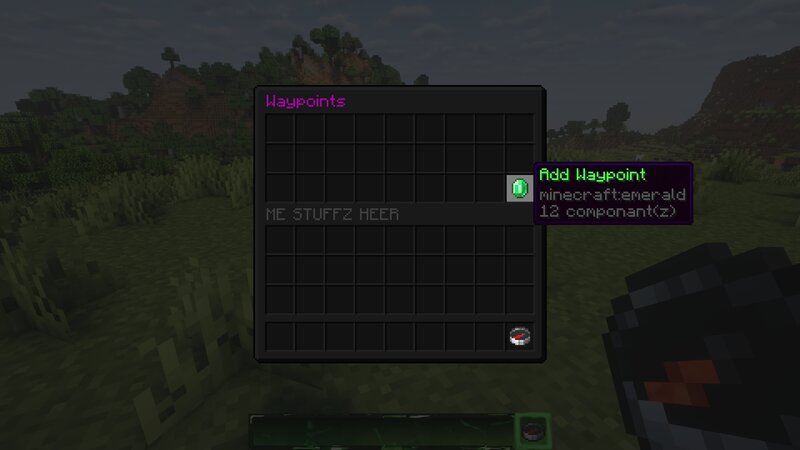
Ender Compass – Fast Travel Made Simple Tired of trekking 500+ blocks just to reach your iron farm or mob grinder? Say goodbye to endless walking and hello to instant travel! Ender Compass is a lightweight Paper plugin that introduces a brand-new item allowing players to save locations as waypoints and teleport to them instantly . With just a few XP levels, players can warp around the server effortlessly, making exploration, farming, and base management faster and more enjoyable. Features 📍 Save up to ten waypoints at any location ⚡ Teleport instantly by left clicking the waypoint ✏️ Rename and delete waypoints with shift+left click to rename and right click to delete 🌍 Cross-dimension travel (Nether / End / Overworld) for +5 XP levels 🧭 Simple, intuitive GUI – easy for any player to understand 🛠️ Balanced & survival-friendly crafting recipe (see picture 3) Why Use Ender Compass? No commands required Encourages exploration without frustration Perfect for SMPs, survival servers, and small communities Clean, straightforward design that feels vanilla-friendly If you're a server owner looking to enhance your players’ experience without overcomplicating gameplay, Ender Compass is exactl
Added value
What’s included on this page
Preview, categories, compatibility, and tools on this page — not a bare file mirror.
- Creator
- HackerHase
- Source
- Minecraft downloads library on Eaglercraft Studio
- Type
- Minecraft mod
- Price
- Free download on Eaglercraft Studio
- Curation
- Listed with credit to HackerHase · studio preview & install guide
- Game Version
- Minecraft 1.21.11
- Compatible with
- Minecraft Java (match version / loader in facts)
- Tags
- Functional
Install guide
How to install this free Minecraft mod
Eaglercraft Studio listing with metadata, creator credit, and loader-aware install guidance.
- 1Download the jar/zip when available.
- 2Install the matching loader (Forge, Fabric, or NeoForge) for your Minecraft version.
- 3Drop the mod into your mods folder, then launch with that profile.
Wrong loader or game version usually crashes on startup — read the facts on this page first.
Related free mods
More curated mods from the same library section.

Pastelmooncrafting15 · 67 diamonds · 20 views

PotatoWolfie · 60 diamonds · 2 views

PotatoWolfie · 53 diamonds · 622 views

Janss_33PL · 47 diamonds · 940 views