
Welcomescreen v2.0.0
Creator: Maraudeur001 · 2026-04-10 · Mods · Free on Eaglercraft Studio
Download Welcomescreen v2.0.0 — free Minecraft mod. Created by Maraudeur001. Tagged connect, disclaimer, new content, prompt. Check the file details for Forge, Fabric, or NeoForge before installing.
Creator notes
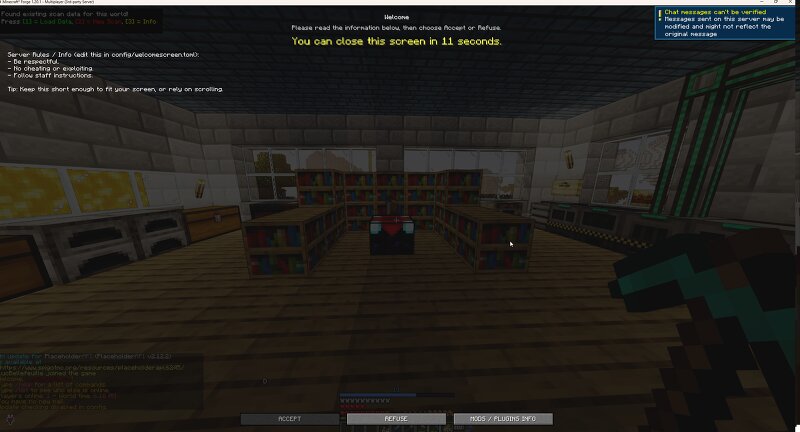
# Welcome Screen **A configurable fullscreen welcome screen for Minecraft servers.** When a player joins your server, a fullscreen overlay appears with your rules, terms of service, or any message you want. Players must click Accept to play — or get kicked. Simple, clean, fully server-configurable. --- ## How It Works 1. Player joins the server 2. A fullscreen welcome screen appears with your title, message, and buttons 3. Player reads your rules and clicks **Accept** to continue playing 4. If they click **Refuse** , they get disconnected with a configurable kick message 5. Once accepted, the player is remembered — they won't see the screen again unless you want them to Everything is configured server-side. The client just displays what the server sends — no client config needed. --- ## Features ### Fullscreen Welcome Message - **Title and subtitle** at the top — your server name, welcome greeting, whatever you want - **Body text** — rules, terms of service, important announcements (scrollable if long) - **Accept / Refuse buttons** — refuse kicks the player with a custom message - Supports Minecraft formatting codes for colors and styling ### Acceptance Tracking - Players who accep
Added value
What’s included on this page
Preview, categories, compatibility, and tools on this page — not a bare file mirror.
- Creator
- Maraudeur001
- Source
- Minecraft downloads library on Eaglercraft Studio
- Type
- Minecraft mod
- Price
- Free download on Eaglercraft Studio
- Curation
- Listed with credit to Maraudeur001 · studio preview & install guide
- Game Version
- Minecraft 1.20.1
- Compatible with
- Minecraft Java (match version / loader in facts)
- Tags
- Connect, Disclaimer, New Content, Prompt, Screen, Server
Install guide
How to install this free Minecraft mod
Eaglercraft Studio listing with metadata, creator credit, and loader-aware install guidance.
- 1Download the jar/zip when available.
- 2Install the matching loader (Forge, Fabric, or NeoForge) for your Minecraft version.
- 3Drop the mod into your mods folder, then launch with that profile.
Wrong loader or game version usually crashes on startup — read the facts on this page first.
Related free mods
More curated mods from the same library section.

Pastelmooncrafting15 · 67 diamonds · 20 views

PotatoWolfie · 60 diamonds · 2 views

PotatoWolfie · 53 diamonds · 622 views

Janss_33PL · 47 diamonds · 940 views