
What Is In That Shelf
Creator: MyAndy · 2026-03-15 · Mods · Free on Eaglercraft Studio
Download What Is In That Shelf — free Minecraft mod. Created by MyAndy. Tagged information, insideshelf, other, shelf. Check the file details for Forge, Fabric, or NeoForge before installing.
Creator notes
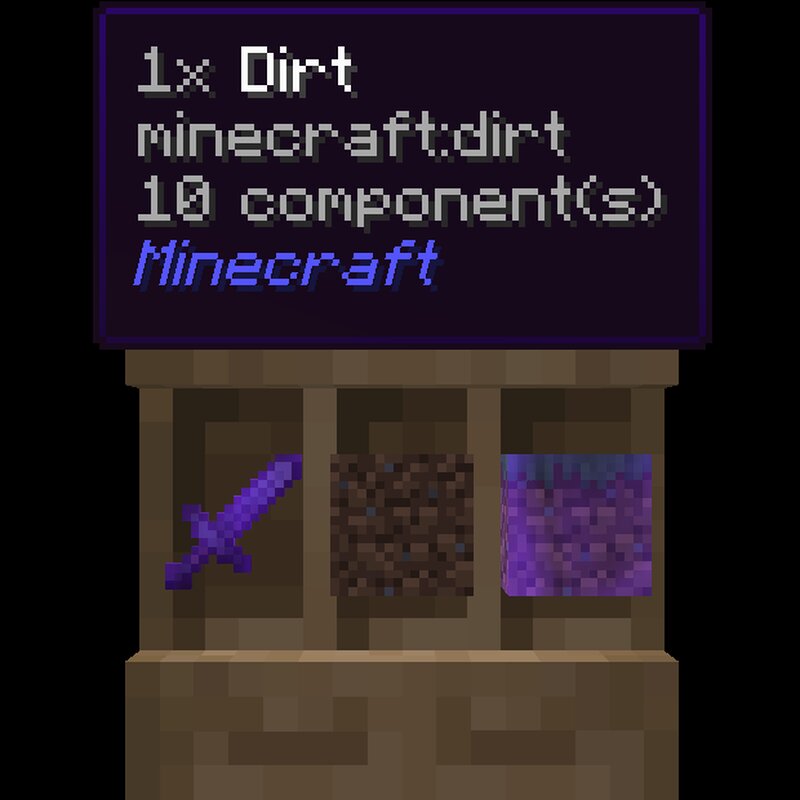
1.21.9-1.21.10-1.21.11 - 26.1 In Short: See what is in a shelf block as a tooltip in your screen. # WhatIsInThatShelf (WIITS) *Never wonder what's sitting on that shelf again.* WhatIsInThatShelf is a lightweight utility mod that adds a clean, highly-configurable HUD tooltip for Shelf blocks. Instead of opening an inventory to check your items, simply look at a shelf to see exactly what is inside. ## ✨ Primary Features ### 📦 Smart Item Detection When looking at a shelf, the mod identifies the specific slot your crosshair is targeting and displays its contents instantly. * Triple Mode: If you prefer to see everything at once, you can enable Triple Mode in the settings to display all three shelf slots simultaneously. * Adjustable Spacing: Use the "Gap" slider to fine-tune the distance between these three tooltips, whether they are stacked vertically or spread horizontally. ### 🛠️ Live Configuration Forget about restarting your game to change settings. Pressing "I" (the default, rebindable key) opens a specialized settings screen. * Visual Feedback: Because the settings menu is 100% transparent, you can see HUD changes in real-time as you toggle options. * Dynamic Scaling: The "Scale"
Added value
What’s included on this page
Preview, categories, compatibility, and tools on this page — not a bare file mirror.
- Creator
- MyAndy
- Source
- Minecraft downloads library on Eaglercraft Studio
- Type
- Minecraft mod
- Price
- Free download on Eaglercraft Studio
- Curation
- Listed with credit to MyAndy · studio preview & install guide
- Game Version
- Minecraft 26.2
- Compatible with
- Minecraft Java (match version / loader in facts)
- Tags
- Information, Insideshelf, Other, Shelf, Shelfblock, Shelfblocks
Install guide
How to install this free Minecraft mod
Eaglercraft Studio listing with metadata, creator credit, and loader-aware install guidance.
- 1Download the jar/zip when available.
- 2Install the matching loader (Forge, Fabric, or NeoForge) for your Minecraft version.
- 3Drop the mod into your mods folder, then launch with that profile.
Wrong loader or game version usually crashes on startup — read the facts on this page first.
Related free mods
More curated mods from the same library section.

Pastelmooncrafting15 · 67 diamonds · 20 views

PotatoWolfie · 60 diamonds · 2 views

PotatoWolfie · 53 diamonds · 622 views

Janss_33PL · 47 diamonds · 940 views