
Who I Am
Creator: lyuwenhan · 2026-08-05 · Mods · Free on Eaglercraft Studio
Download Who I Am — free Minecraft mod. Created by lyuwenhan. Tagged functional. Check the file details for Forge, Fabric, or NeoForge before installing.
Creator notes
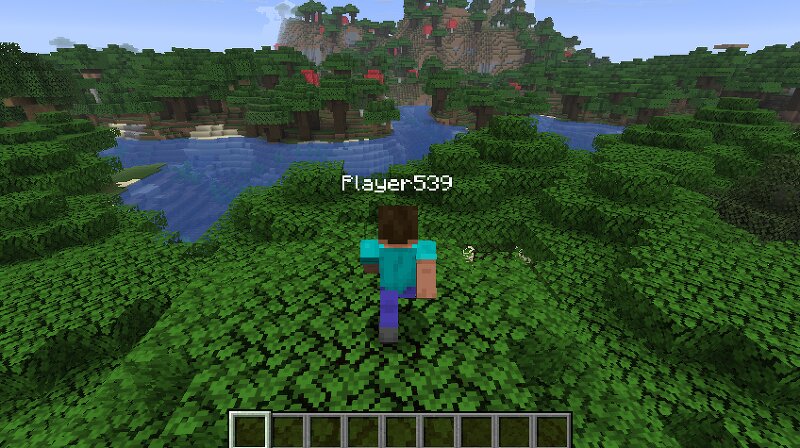
Languages EN/English | ZH-CN/简体中文 Who I Am A client-side Fabric mod that displays your own Minecraft player name in places where it is normally hidden. This mod runs entirely on the client and does not modify any server behavior. Features Shows your own name tag in third-person view Shows your own name tag when the camera is detached from the local player, including free-camera views Appends the current player name to the end of the Minecraft window title Provides the client-side /i command to display the current player name No server-side plugin or mod required Commands Show current player name /i Prints You are: <player name> in the client chat The command is handled locally and is not sent to the server How It Works The mod reads the current player name from the active Minecraft client session When the local player model is rendered: The name tag is forced to display in third-person view The name tag is also forced to display when the camera is detached from the local player Whenever Minecraft generates the window title, the player name is appended to the end Running /i displays the same player name in the client chat The mod does not send additional packets, require server supp
Added value
What’s included on this page
Preview, categories, compatibility, and tools on this page — not a bare file mirror.
- Creator
- lyuwenhan
- Source
- Minecraft downloads library on Eaglercraft Studio
- Type
- Minecraft mod
- Price
- Free download on Eaglercraft Studio
- Curation
- Listed with credit to lyuwenhan · studio preview & install guide
- Game Version
- Minecraft 26.3 snapshot
- Compatible with
- Minecraft Java (match version / loader in facts)
- Tags
- Functional
Install guide
How to install this free Minecraft mod
Eaglercraft Studio listing with metadata, creator credit, and loader-aware install guidance.
- 1Download the jar/zip when available.
- 2Install the matching loader (Forge, Fabric, or NeoForge) for your Minecraft version.
- 3Drop the mod into your mods folder, then launch with that profile.
Wrong loader or game version usually crashes on startup — read the facts on this page first.
Related free mods
More curated mods from the same library section.

Pastelmooncrafting15 · 67 diamonds · 20 views

PotatoWolfie · 60 diamonds · 2 views

PotatoWolfie · 53 diamonds · 622 views

Janss_33PL · 47 diamonds · 940 views