
xravcapes
Creator: RavenaStar · 2026-09-09 · Mods · Free on Eaglercraft Studio
Download xravcapes — free Minecraft mod. Created by RavenaStar. Tagged fabric, minecraft, mod, other. Check the file details for Forge, Fabric, or NeoForge before installing.
Creator notes
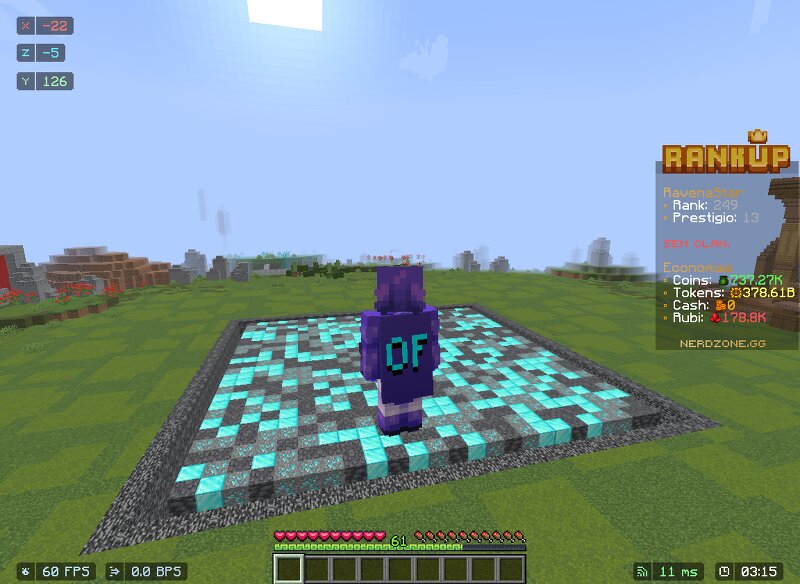
XRAVCAPES Client-side mod for Fabric ( Minecraft 1.21.11 ) that displays OptiFine and native Minecraft capes without OptiFine installed. Native language: Brazilian Portuguese (🇧🇷) 📋 Requirements Requirement Version Fabric Loader >= 0.18.0 Download Fabric API 0.141.6+1.21.11 Modrinth · GitHub Minecraft 1.21.11 — Java >= 21 Adoptium All dependencies declared in fabric.mod.json . Fabric Loader prevents loading if any are missing or incompatible. ✨ Features Priority System (Score-based) Source Score OptiFine cape 1.0 Minecraft (vanilla) cape 0.9 Other sources 0.8 Commands & Settings /xravcapes — Open settings menu (no keybind) Automatic — Respects priority hierarchy Force OptiFine Force Vanilla Disable custom display /xravcapes reload — Refresh cached capes Additional Quick cape preview in menu 100% client-side — No server required Auto-translation: pt_br / pt_pt if Portuguese, otherwise en_us 🔧 Compatibility Locked to Minecraft 1.21.11 minecraft_version = 1.21.11 yarn_mappings = 1.21.11+build.6 loader_version = 0.18.1 fabric_version = 0.141.6+1.21.11 loom = 1.14 fabric.mod.json enforces "minecraft": "1.21.11" — mod won't load on other versions. 📜 Credits Made with 💚 by RavenaStar
Added value
What’s included on this page
Preview, categories, compatibility, and tools on this page — not a bare file mirror.
- Creator
- RavenaStar
- Source
- Minecraft downloads library on Eaglercraft Studio
- Type
- Minecraft mod
- Price
- Free download on Eaglercraft Studio
- Curation
- Listed with credit to RavenaStar · studio preview & install guide
- Game Version
- Minecraft 1.21.11
- Compatible with
- Minecraft Java (match version / loader in facts)
- Tags
- Fabric, Minecraft, Mod, Other, Ravenastar
Install guide
How to install this free Minecraft mod
Eaglercraft Studio listing with metadata, creator credit, and loader-aware install guidance.
- 1Download the jar/zip when available.
- 2Install the matching loader (Forge, Fabric, or NeoForge) for your Minecraft version.
- 3Drop the mod into your mods folder, then launch with that profile.
Wrong loader or game version usually crashes on startup — read the facts on this page first.
Related free mods
More curated mods from the same library section.

Pastelmooncrafting15 · 67 diamonds · 20 views

PotatoWolfie · 60 diamonds · 2 views

PotatoWolfie · 53 diamonds · 622 views

Janss_33PL · 47 diamonds · 940 views