
Youtuber plushies
Creator: Janjaa suld · 2026-05-16 · Mods · Free on Eaglercraft Studio
Download Youtuber plushies — free Minecraft mod. Created by Janjaa suld. Tagged bedrock, mam, other, performance. Check the file details for Forge, Fabric, or NeoForge before installing.
Creator notes
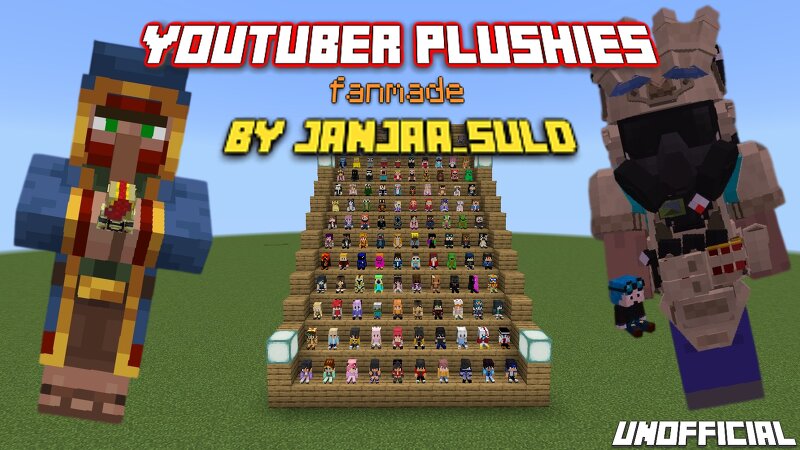
Hello there pmc users i present you guys a Youtuber plushies addon from bedrock. As for developing i didn't used any other mods for stealing some of there work! I made them from a scratch using MAM(Minecraft addons maker) however skins don't. Each or some plushies have there own properties such as being though on fire, explosion and even used as a light. This is fanmade not official mod. About mod performance and size •Non experimental •Achievement friendly •6.5mb total (Including both resource and behavior) About Plushies •Is it obtainable on survival? Yes by trading with wandering trader and seller derpy(Derpy) •Has unique sitting pose •High resolution •4 types of models-adult, adult 3px, baby, baby 3px •Types-Basic and premium About Derpy and trading Derpy is a npc who sells all types of plushies which wanderer don't. He can equip and pickup any items quite smart and you can be friend with pufferfish very compatible on advance tactical gear addon by v19bt he spawns in a overworld but barely Trading-There are 3 lvls of trades lvl1 is for newer, lvl2- old and og, lvl3- premium and author plushies which is bit more expensive Certified on 1.21.130.10 minecraft but who would knew it
Added value
What’s included on this page
Preview, categories, compatibility, and tools on this page — not a bare file mirror.
- Creator
- Janjaa suld
- Source
- Minecraft downloads library on Eaglercraft Studio
- Type
- Minecraft mod
- Price
- Free download on Eaglercraft Studio
- Curation
- Listed with credit to Janjaa suld · studio preview & install guide
- Game Version
- Minecraft 26.1.1
- Compatible with
- Minecraft Java (match version / loader in facts)
- Tags
- Bedrock, Mam, Other, Performance, Plushies, Skins
Install guide
How to install this free Minecraft mod
Eaglercraft Studio listing with metadata, creator credit, and loader-aware install guidance.
- 1Download the jar/zip when available.
- 2Install the matching loader (Forge, Fabric, or NeoForge) for your Minecraft version.
- 3Drop the mod into your mods folder, then launch with that profile.
Wrong loader or game version usually crashes on startup — read the facts on this page first.
Related free mods
More curated mods from the same library section.

Pastelmooncrafting15 · 67 diamonds · 20 views

PotatoWolfie · 60 diamonds · 2 views

PotatoWolfie · 53 diamonds · 622 views

Janss_33PL · 47 diamonds · 940 views