
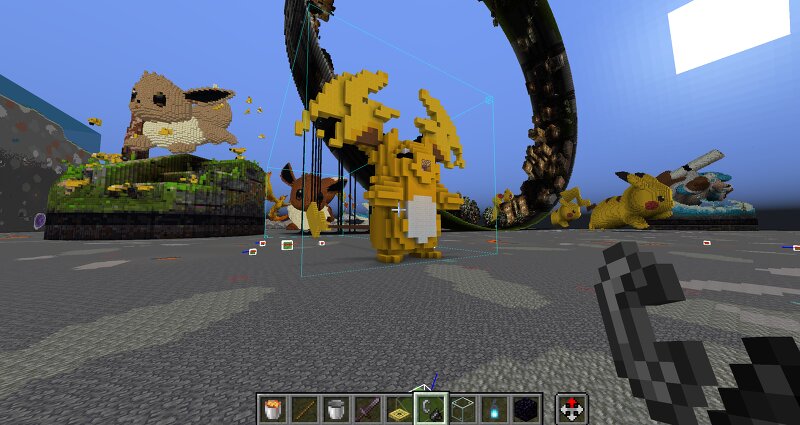
#0026 Mega Raichu Y
Creator: FatPat666 · 2026-09-05 · Maps · Free on Eaglercraft Studio
Download #0026 Mega Raichu Y — free Minecraft map. Created by FatPat666. Tagged 3d art, pokemon, se7ensins. Get the world/schematic file when available and explore more free maps on Eaglercraft Studio.
Creator notes
Also used for my s7 tutorial +-------------------+-------+---------+------------------------------+ | Material List for placement 'Se7enSins TUTSFP6 ' | +-------------------+-------+---------+------------------------------+ | Item | Total | Missing | Available | +-------------------+-------+---------+------------------------------+ | Yellow Wool | 898 | 0 | 0 | | Yellow Concrete | 786 | 0 | 0 | | Black Concrete | 110 | 0 | 0 | | Brown Concrete | 101 | 0 | 0 | | White Wool | 44 | 0 | 0 | | Brown Wool | 26 | 0 | 0 | | Pink Concrete | 16 | 0 | 0 | | Basalt | 14 | 0 | 0 | | Glowstone | 10 | 0 | 0 | | White Terracotta | 9 | 0 | 0 | | Black Terracotta | 4 | 0 | 0 | | Orange Terracotta | 4 | 0 | 0 | +-------------------+-------+---------+------------------------------+ | Item | Total | Missing | Available | +-------------------+-------+---------+------------------------------+ Fair Use License: CC AttributionCreative Commons Attribution creativecommons.org/licenses/by/4.0/ Quote. You are free to: Share — copy and redistribute the material in any medium or format for any purpose, even commercially. Adapt — remix, transform, and build upon the material for any purpose, even commercially. Th
Added value
What’s included on this page
Preview, categories, compatibility, and tools on this page — not a bare file mirror.
- Creator
- FatPat666
- Source
- Minecraft downloads library on Eaglercraft Studio
- Type
- Minecraft map / world
- Price
- Free download on Eaglercraft Studio
- Curation
- Listed with credit to FatPat666 · studio preview & install guide
- Compatible with
- Minecraft Java (match version / loader in facts)
- Tags
- 3d Art, Pokemon, Se7ensins
Install guide
How to install this free Minecraft map
Eaglercraft Studio map listing with preview, creator credit, and install steps for Java worlds.
- 1Download the world archive (.zip / .mcworld / schematic) when available.
- 2For Java: extract into your .minecraft/saves folder (or import via your launcher).
- 3Launch Minecraft, select the world, and play. Keep a backup before overwriting saves.
Check any version notes in the facts panel — maps often target a specific Minecraft release.
Related free maps
More curated maps from the same library section.

CraftyFoxe · 761 diamonds · 418 views

CraftyFoxe · 761 diamonds · 339 views

CraftyFoxe · 761 diamonds · 319 views

CraftyFoxe · 761 diamonds · 306 views