
1:2 Scale Arecibo Observatory
Creator: RandyShughart · 2026-09-01 · Maps · Free on Eaglercraft Studio
Download 1:2 Scale Arecibo Observatory — free Minecraft map. Created by RandyShughart. Tagged complex. Get the world/schematic file when available and explore more free maps on Eaglercraft Studio.
Creator notes
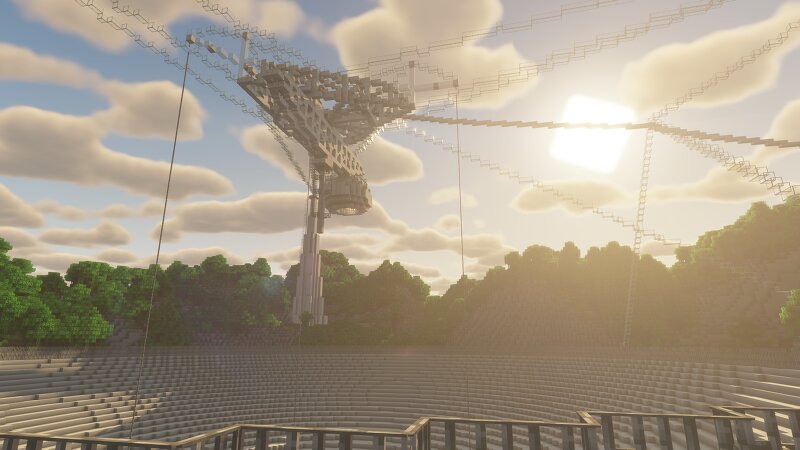
This is a recreation of the Arecibo Observatory, located in the mountainous karst region within the municipality of Arecibo in Puerto Rico. The map is not complete, as it is missing various complexes in and around the main dish. The surrounding terrain is accurate, made using WorldPainter and LIDAR data. The terrain and telescope are both in 1:2 scale, meaning one block = 2 real-world meters. This is a test upload as part of a project to recreate the complex in 1:1 scale, which is currently ongoing. The surrounding landscape is 2k by 2k, as I felt it did not need to be substantially large given the small size of the main dish. The Arecibo Observatory was the world's largest radio telescope for 53 years, and was featured in various films, such as Goldeneye , Contact , and Species. It is also seen notably in Goldeneye 007 and Battlefield 4. The telescope collapsed on December 1st, 2020 due to multiple cable failiures after an auxiliary cable snapped and damaged the dish earlier that year. Preview of the 1:1 scale platform:
Added value
What’s included on this page
Preview, categories, compatibility, and tools on this page — not a bare file mirror.
- Creator
- RandyShughart
- Source
- Minecraft downloads library on Eaglercraft Studio
- Type
- Minecraft map / world
- Price
- Free download on Eaglercraft Studio
- Curation
- Listed with credit to RandyShughart · studio preview & install guide
- Compatible with
- Minecraft Java (match version / loader in facts)
- Tags
- Complex
Install guide
How to install this free Minecraft map
Eaglercraft Studio map listing with preview, creator credit, and install steps for Java worlds.
- 1Download the world archive (.zip / .mcworld / schematic) when available.
- 2For Java: extract into your .minecraft/saves folder (or import via your launcher).
- 3Launch Minecraft, select the world, and play. Keep a backup before overwriting saves.
Check any version notes in the facts panel — maps often target a specific Minecraft release.
Related free maps
More curated maps from the same library section.

CraftyFoxe · 761 diamonds · 418 views

CraftyFoxe · 761 diamonds · 339 views

CraftyFoxe · 761 diamonds · 319 views

CraftyFoxe · 761 diamonds · 306 views