
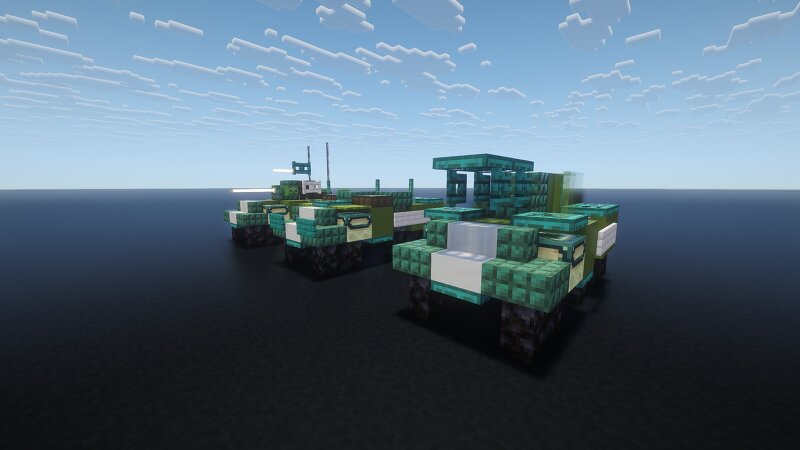
1.5:1 Scale M8 Greyhound and family
Creator: _MALTA_ · 2026-09-03 · Maps · Free on Eaglercraft Studio
Download 1.5:1 Scale M8 Greyhound and family — free Minecraft map. Created by _MALTA_. Tagged other. Get the world/schematic file when available and explore more free maps on Eaglercraft Studio.
Creator notes
The M8 light armored car is a 6×6 armored car produced by the Ford Motor Company during World War II. It was used from 1943 by United States and British forces in Europe and the Pacific until the end of the war. The vehicle was widely exported and as of 2024 still remained in service with some countries. In British service, the M8 was known as the "Greyhound," a service name seldom, if ever, used by the US. The British Army found it too lightly armored, particularly the hull floor, which anti-tank mines could easily penetrate (the crews' solution was lining the floor of the crew compartment with sandbags). Nevertheless, it was produced in large numbers. The M8 Greyhound's excellent road mobility made it a great supportive element in the advancing American and British armored columns. It was marginal cross country, especially in mud. Features: -M8 Greyhound -M20 Armored Utility Car -T96 Multiple Gun Motor Carriage Please let me know what you would like to see me build WW2 military wise in the comments, I might make some exceptions. I try to make things that no one else has made before.
Added value
What’s included on this page
Preview, categories, compatibility, and tools on this page — not a bare file mirror.
- Creator
- _MALTA_
- Source
- Minecraft downloads library on Eaglercraft Studio
- Type
- Minecraft map / world
- Price
- Free download on Eaglercraft Studio
- Curation
- Listed with credit to _MALTA_ · studio preview & install guide
- Compatible with
- Minecraft Java (match version / loader in facts)
- Tags
- Other
Install guide
How to install this free Minecraft map
Eaglercraft Studio map listing with preview, creator credit, and install steps for Java worlds.
- 1Download the world archive (.zip / .mcworld / schematic) when available.
- 2For Java: extract into your .minecraft/saves folder (or import via your launcher).
- 3Launch Minecraft, select the world, and play. Keep a backup before overwriting saves.
Check any version notes in the facts panel — maps often target a specific Minecraft release.
Related free maps
More curated maps from the same library section.

CraftyFoxe · 761 diamonds · 418 views

CraftyFoxe · 761 diamonds · 339 views

CraftyFoxe · 761 diamonds · 319 views

CraftyFoxe · 761 diamonds · 306 views