
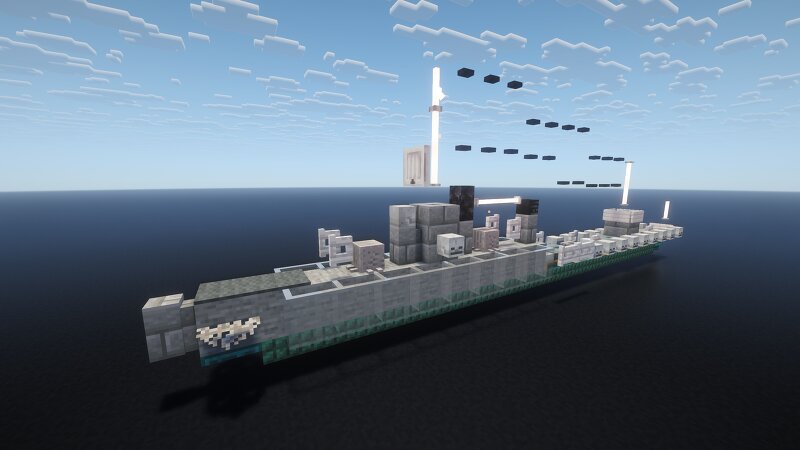
1.5:1 scale RN Leone
Creator: _MALTA_ · 2026-09-09 · Maps · Free on Eaglercraft Studio
Download 1.5:1 scale RN Leone — free Minecraft map. Created by _MALTA_. Tagged other. Get the world/schematic file when available and explore more free maps on Eaglercraft Studio.
Creator notes
The Italian destroyer Leone was the lead ship of her class of scout cruisers (later reclassified as destroyers) that served in the Regia Marina (Royal Italian Navy) during World War II. She was mostly stationed in Italian East Africa as part of the Red Sea Flotilla based in Massawa, Eritrea. She was also tasked with laying minefields and trying to disrupt British supply lines and convoys in the Red Sea. Leone participated in an attack on the Allied convoy BN 7 on October 21, 1940, alongside sister ship Pantera and others, though the attack was heavily repulsed. As British forces advanced in East Africa and the Italian position collapsed in early 1941, the ships stationed at Massawa had to evacuate. On April 1, 1941, Leone struck an uncharted reef off the coast, causing a massive gash and a severe fire in the boiler room. Because the damage was too severe and the ship could not be saved, her crew scuttled her to prevent capture. Her remaining sister ships (Tigre and Pantera) rescued her crew before meeting a similar scuttling fate days later. Please let me know what you would like to see me build WW2 military wise in the comments, I might make some exceptions. I try to make things t
Added value
What’s included on this page
Preview, categories, compatibility, and tools on this page — not a bare file mirror.
- Creator
- _MALTA_
- Source
- Minecraft downloads library on Eaglercraft Studio
- Type
- Minecraft map / world
- Price
- Free download on Eaglercraft Studio
- Curation
- Listed with credit to _MALTA_ · studio preview & install guide
- Compatible with
- Minecraft Java (match version / loader in facts)
- Tags
- Other
Install guide
How to install this free Minecraft map
Eaglercraft Studio map listing with preview, creator credit, and install steps for Java worlds.
- 1Download the world archive (.zip / .mcworld / schematic) when available.
- 2For Java: extract into your .minecraft/saves folder (or import via your launcher).
- 3Launch Minecraft, select the world, and play. Keep a backup before overwriting saves.
Check any version notes in the facts panel — maps often target a specific Minecraft release.
Related free maps
More curated maps from the same library section.

CraftyFoxe · 761 diamonds · 418 views

CraftyFoxe · 761 diamonds · 339 views

CraftyFoxe · 761 diamonds · 319 views

CraftyFoxe · 761 diamonds · 306 views