
1:5 scale RN Nino Bixio
Creator: _MALTA_ · 2026-09-14 · Maps · Free on Eaglercraft Studio
Download 1:5 scale RN Nino Bixio — free Minecraft map. Created by _MALTA_. Tagged other. Get the world/schematic file when available and explore more free maps on Eaglercraft Studio.
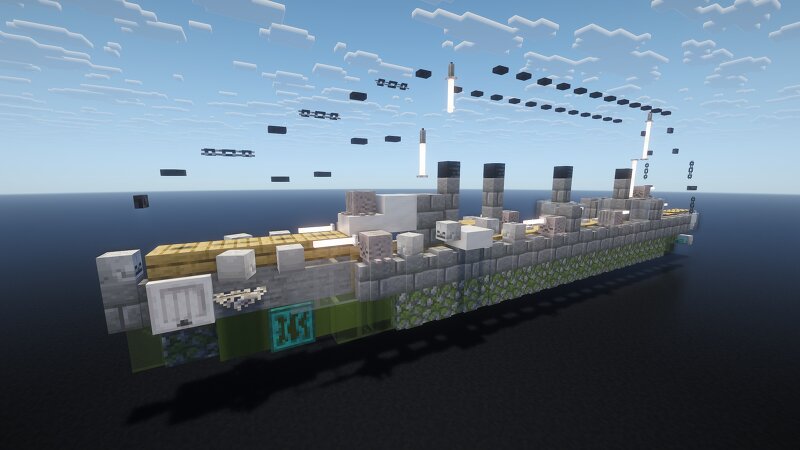
Creator notes
The Nino Bixio class was a pair of protected cruisers built for the Italian Regia Marina (Royal Navy) in the 1910s. The two ships, Nino Bixio, and Marsala, were built in Castellammare between 1911 and 1914. They were intended to serve as scouts for the main Italian fleet, and as such required a high top speed. They were overweight as built, which prevented them from reaching their intended maximum speed. They were a disappointment in service, especially compared to the earlier—and faster—cruiser Quarto, which cut their careers short. Both ships saw limited action during World War I, largely a result of the cautious strategies employed by the Regia Marina and its opponent, the Austro-Hungarian Navy. Nino Bixio was involved in the pursuit of a group of Austro-Hungarian raiders in December 1915, but did not engage them before they escaped. Marsala briefly battled Austro-Hungarian cruisers during the Battle of the Otranto Straits in May 1917. Both ships were sold for scrapping in the late 1920s, the victims of very tight naval budgets and their own poor performance. Please let me know what you would like to see me build WW2 military wise in the comments, I might make some exceptions. I
Added value
What’s included on this page
Preview, categories, compatibility, and tools on this page — not a bare file mirror.
- Creator
- _MALTA_
- Source
- Minecraft downloads library on Eaglercraft Studio
- Type
- Minecraft map / world
- Price
- Free download on Eaglercraft Studio
- Curation
- Listed with credit to _MALTA_ · studio preview & install guide
- Compatible with
- Minecraft Java (match version / loader in facts)
- Tags
- Other
Install guide
How to install this free Minecraft map
Eaglercraft Studio map listing with preview, creator credit, and install steps for Java worlds.
- 1Download the world archive (.zip / .mcworld / schematic) when available.
- 2For Java: extract into your .minecraft/saves folder (or import via your launcher).
- 3Launch Minecraft, select the world, and play. Keep a backup before overwriting saves.
Check any version notes in the facts panel — maps often target a specific Minecraft release.
Related free maps
More curated maps from the same library section.

CraftyFoxe · 761 diamonds · 418 views

CraftyFoxe · 761 diamonds · 339 views

CraftyFoxe · 761 diamonds · 319 views

CraftyFoxe · 761 diamonds · 306 views