
100% Blast-proof Lucky Block Skyblock v1.1
Creator: SamV_Cosmos · 2026-09-28 · Maps · Free on Eaglercraft Studio
Download 100% Blast-proof Lucky Block Skyblock v1.1 — free Minecraft map. Created by SamV_Cosmos. Tagged air structure. Get the world/schematic file when available and explore more free maps on Eaglercraft Studio.
Creator notes
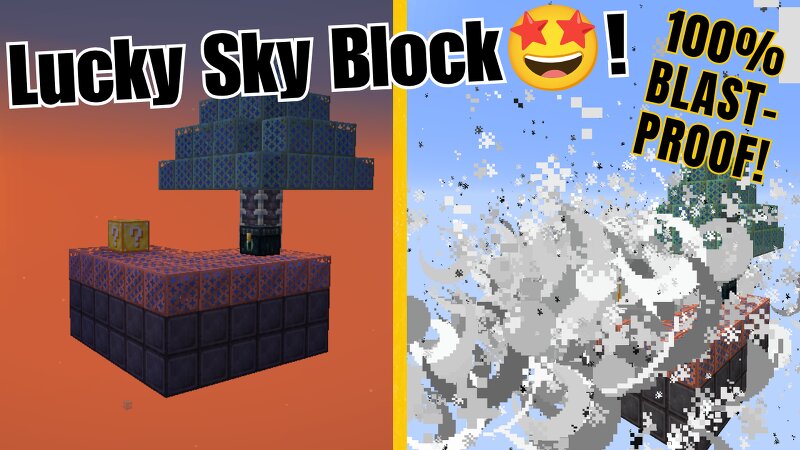
🌟 The Ultimate Solution: 100% Blast-Proof Lucky Block Skyblock v1.1 Are you constantly worried about a rogue Creeper sneaking up behind you, or a sudden giant TNT chain reaction completely blowing your Skyblock island into the void? Do you hate losing your hard-earned blocks and items to unlucky explosions? **Say no more! This map is the ultimate solution!** Welcome to a survival experience crafted with the ultimate hardcore blast-proof aesthetics. This map features: 🛡️ 100% Blast-Proof Foundation Built entirely with Waterlogged Copper Grates and Reinforced Deepslate. This platform is completely immune to any and all explosions! Chaos is welcome here. 🔥 Update v1.1 - The Ender Dragon Challenge! Horse Army:A hidden stack of wheat seeds has been placed inside the Ender Chest. Go find the trial spawners and tame your very own army of white horses! The End Portal: A floating, open-air End Portal has generated nearby, pre-installed with 8 Eyes of Ender. Can you test your luck with the Lucky Blocks to find the remaining 4 eyes, enter the End, and defeat the Ender Dragon? 🎮 Game Version Info: Minecraft Base:1.21+ (Compatible with latest versions) Mod Loader: NeoForge / Forge ⚠️ Required M
Added value
What’s included on this page
Preview, categories, compatibility, and tools on this page — not a bare file mirror.
- Creator
- SamV_Cosmos
- Source
- Minecraft downloads library on Eaglercraft Studio
- Type
- Minecraft map / world
- Price
- Free download on Eaglercraft Studio
- Curation
- Listed with credit to SamV_Cosmos · studio preview & install guide
- Compatible with
- Minecraft Java (match version / loader in facts)
- Tags
- Air Structure
Install guide
How to install this free Minecraft map
Eaglercraft Studio map listing with preview, creator credit, and install steps for Java worlds.
- 1Download the world archive (.zip / .mcworld / schematic) when available.
- 2For Java: extract into your .minecraft/saves folder (or import via your launcher).
- 3Launch Minecraft, select the world, and play. Keep a backup before overwriting saves.
Check any version notes in the facts panel — maps often target a specific Minecraft release.
Related free maps
More curated maps from the same library section.

CraftyFoxe · 761 diamonds · 418 views

CraftyFoxe · 761 diamonds · 339 views

CraftyFoxe · 761 diamonds · 319 views

CraftyFoxe · 761 diamonds · 306 views