
16 YEARS of Server Maps - Medieval Unlimited 2010 to Present - OFFICIAL ARCHIVE
Creator: Neekoris · 2026-08-30 · Maps · Free on Eaglercraft Studio
Download 16 YEARS of Server Maps - Medieval Unlimited 2010 to Present - OFFICIA — free Minecraft map. Created by Neekoris. Tagged archive, kingdom, land structure, medieval. Get the world/schematic file when available and explore more free maps on Eaglercraft Studio.
Creator notes
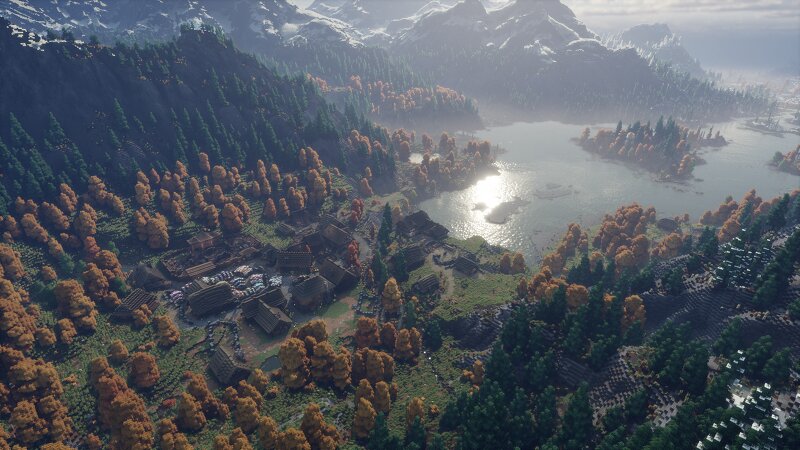
Medieval Unlimited Server Maps Repository Medieval Unlimited was first founded by my brother and I in late 2010. It has gone through countless iterations over the last 16 years and accumulated an unbelievable amount of history in it's worlds. For those that are interested in experiencing the history of Medieval Unlimited first hand, download our official map repository here. It contains all backups of M.U.S maps I have managed to keep since 2010! If you would like to view a detailed walkthrough of our server's history, view our Wiki page below. https://medievalunlimited.notion.site/History-of-Medieval-Unlimited-3a092334f0a080498f03ce5223b7b033 Medieval Unlimited Server Information: Server IP: medievalunlimited.online Discord: https://discord.gg/vgnWPBAaah Planet Minecraft: https://www.planetminecraft.com/server/medieval-unlimited-1-19-3-factions-survival-semi-roleplay-realistic-gameplay-custom-biomes-and-more/ Here is to the future of Medieval Unlimited and all the friends we have made along the way!
Added value
What’s included on this page
Preview, categories, compatibility, and tools on this page — not a bare file mirror.
- Creator
- Neekoris
- Source
- Minecraft downloads library on Eaglercraft Studio
- Type
- Minecraft map / world
- Price
- Free download on Eaglercraft Studio
- Curation
- Listed with credit to Neekoris · studio preview & install guide
- Compatible with
- Minecraft Java (match version / loader in facts)
- Tags
- Archive, Kingdom, Land Structure, Medieval, Medievalkingdom, Medievalunlimited
Install guide
How to install this free Minecraft map
Eaglercraft Studio map listing with preview, creator credit, and install steps for Java worlds.
- 1Download the world archive (.zip / .mcworld / schematic) when available.
- 2For Java: extract into your .minecraft/saves folder (or import via your launcher).
- 3Launch Minecraft, select the world, and play. Keep a backup before overwriting saves.
Check any version notes in the facts panel — maps often target a specific Minecraft release.
Related free maps
More curated maps from the same library section.

CraftyFoxe · 761 diamonds · 418 views

CraftyFoxe · 761 diamonds · 339 views

CraftyFoxe · 761 diamonds · 319 views

CraftyFoxe · 761 diamonds · 306 views