
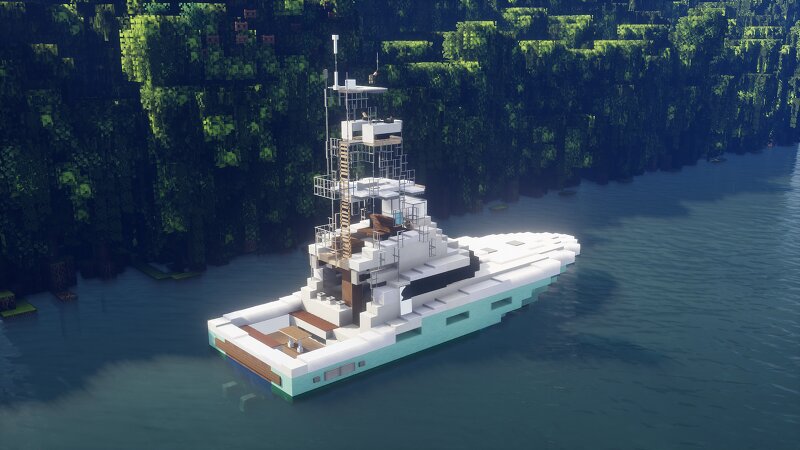
2020 Viking 68C (68ft) - 1.5:1 scale
Creator: Snabbasaker · 2026-09-30 · Maps · Free on Eaglercraft Studio
Download 2020 Viking 68C (68ft) - 1.5:1 scale — free Minecraft map. Created by Snabbasaker. Tagged boat, snabbasaker, viking, water structure. Get the world/schematic file when available and explore more free maps on Eaglercraft Studio.
Creator notes
This is my recreation of a 2020 MY Viking 68C Mk2, built by Viking Yachts, in MC. It's built in 1.20.1 with worldedit and a lot of debugging ;) It's 30 blocks long overall, with a 27 block long waterline, 9 block beam and 2.5 blocks draught. Dual sterndrives and two fly-bridges! It's fully furnished and features two bedroom suites along with two WCs, a galley, and a helm. As you can see, it has a massive tuna-tower with a roofed flybridge and a roofed crow's nest helm for easy maneuvering. When pasting the schematic, please make sure to use "//paste -e", so the entities are included, as this boat has a lot of item frames, armor stands, etc. If you want to change/add things to the boat, I recommend using the command "//perf off" in worldedit so the debugged stuff doesn't break or shift. The schematic itself is 30x9x22(!) blocks. Also, make sure to not resell or claim this schematic as your own :) Have fun and enjoy your 68C! //Snabbasaker
Added value
What’s included on this page
Preview, categories, compatibility, and tools on this page — not a bare file mirror.
- Creator
- Snabbasaker
- Source
- Minecraft downloads library on Eaglercraft Studio
- Type
- Minecraft map / world
- Price
- Free download on Eaglercraft Studio
- Curation
- Listed with credit to Snabbasaker · studio preview & install guide
- Compatible with
- Minecraft Java (match version / loader in facts)
- Tags
- Boat, Snabbasaker, Viking, Water Structure, Watercraft, Yacht
Install guide
How to install this free Minecraft map
Eaglercraft Studio map listing with preview, creator credit, and install steps for Java worlds.
- 1Download the world archive (.zip / .mcworld / schematic) when available.
- 2For Java: extract into your .minecraft/saves folder (or import via your launcher).
- 3Launch Minecraft, select the world, and play. Keep a backup before overwriting saves.
Check any version notes in the facts panel — maps often target a specific Minecraft release.
Related free maps
More curated maps from the same library section.

CraftyFoxe · 761 diamonds · 418 views

CraftyFoxe · 761 diamonds · 339 views

CraftyFoxe · 761 diamonds · 319 views

CraftyFoxe · 761 diamonds · 306 views