
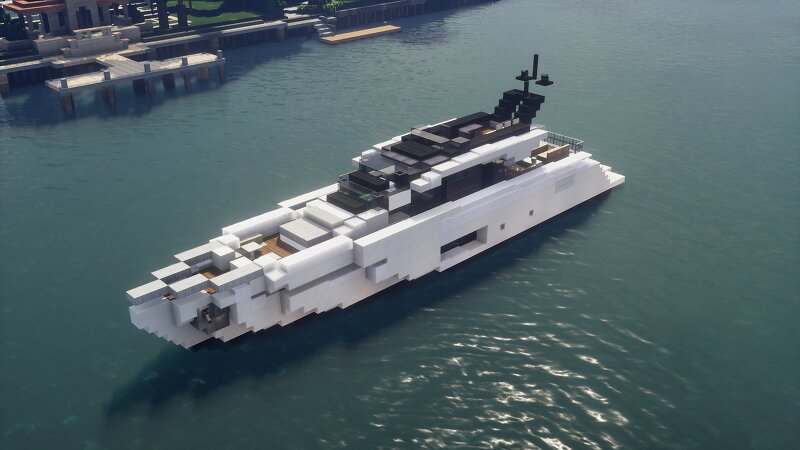
2022 Azimut S10 (94ft) - 1.5:1 scale
Creator: Snabbasaker · 2026-09-27 · Maps · Free on Eaglercraft Studio
Download 2022 Azimut S10 (94ft) - 1.5:1 scale — free Minecraft map. Created by Snabbasaker. Tagged azimut, boat, snabbasaker, water structure. Get the world/schematic file when available and explore more free maps on Eaglercraft Studio.
Creator notes
This is my attempt on creating an Azimut S10, '22 MY in 1.5:1 scale. I built it in 2025 in 1.20.1. It is 45 blocks long overall, with a 40 block long waterline. 9 block beam/breadth and 3 block draught. It has twin dual helix props and is fully furnished. Three bedroom suites, 3 WCs and lost more. I highly recommend downloading and touring the interior! When pasting the schematic, please make sure to use " //paste -e ", so all of the entities are included, as my builds usually include some item frames, armor stands, etc. If you want to change add things to the boat, i recommend using the command " //perf off " in worldedit so the debugged stuff doesn't break. The schematic itself is 45x9x16 blocks. Also, make sure to not resell or claim this schematic as your own :) Please enjoy this yacht as much as I did building it! :) //Snabbasaker
Added value
What’s included on this page
Preview, categories, compatibility, and tools on this page — not a bare file mirror.
- Creator
- Snabbasaker
- Source
- Minecraft downloads library on Eaglercraft Studio
- Type
- Minecraft map / world
- Price
- Free download on Eaglercraft Studio
- Curation
- Listed with credit to Snabbasaker · studio preview & install guide
- Compatible with
- Minecraft Java (match version / loader in facts)
- Tags
- Azimut, Boat, Snabbasaker, Water Structure, Watercraft, Yacht
Install guide
How to install this free Minecraft map
Eaglercraft Studio map listing with preview, creator credit, and install steps for Java worlds.
- 1Download the world archive (.zip / .mcworld / schematic) when available.
- 2For Java: extract into your .minecraft/saves folder (or import via your launcher).
- 3Launch Minecraft, select the world, and play. Keep a backup before overwriting saves.
Check any version notes in the facts panel — maps often target a specific Minecraft release.
Related free maps
More curated maps from the same library section.

CraftyFoxe · 761 diamonds · 418 views

CraftyFoxe · 761 diamonds · 339 views

CraftyFoxe · 761 diamonds · 319 views

CraftyFoxe · 761 diamonds · 306 views