
2500 Block Custom Island – Hand‑Painted in WorldPainter (Beaches, Cliffs, Lakes, Biomes, Mountains)
Creator: reiner2009 · 2026-08-31 · Maps · Free on Eaglercraft Studio
Download 2500 Block Custom Island – Hand‑Painted in WorldPainter (Beaches, Clif — free Minecraft map. Created by reiner2009. Tagged beaches, biomes, cinematic, cliffs. Get the world/schematic file when available and explore more free maps on Eaglercraft Studio.
Creator notes
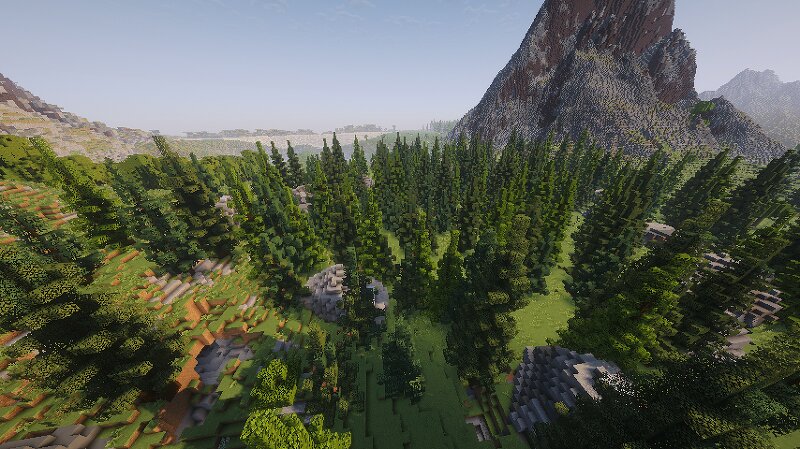
This is a fully hand‑painted custom island with a diameter of about 2500 blocks, created in WorldPainter. The terrain was shaped manually to achieve natural, believable forms and smooth transitions between all regions of the island. The island features a wide variety of landscapes, making it suitable for survival gameplay, creative building, cinematic projects, adventure maps, or server environments. Contents of the Island: Beaches with natural shorelines and smooth coastal transitions Cliffs and rock formations with steep drops and rugged shapes Multiple lakes with detailed shorelines Several biomes including forests, jungle areas, grasslands, coastal zones, and mountain regions Large mountain ranges with realistic height variation Naturally flowing terrain instead of typical Minecraft world‑generation patterns Suitable for: Survival worlds Creative building projects RPG or adventure maps Server spawn or lobby areas Cinematic recordings and trailers Terrain showcase or study
Added value
What’s included on this page
Preview, categories, compatibility, and tools on this page — not a bare file mirror.
- Creator
- reiner2009
- Source
- Minecraft downloads library on Eaglercraft Studio
- Type
- Minecraft map / world
- Price
- Free download on Eaglercraft Studio
- Curation
- Listed with credit to reiner2009 · studio preview & install guide
- Compatible with
- Minecraft Java (match version / loader in facts)
- Tags
- Beaches, Biomes, Cinematic, Cliffs, Customterrian, Island
Install guide
How to install this free Minecraft map
Eaglercraft Studio map listing with preview, creator credit, and install steps for Java worlds.
- 1Download the world archive (.zip / .mcworld / schematic) when available.
- 2For Java: extract into your .minecraft/saves folder (or import via your launcher).
- 3Launch Minecraft, select the world, and play. Keep a backup before overwriting saves.
Check any version notes in the facts panel — maps often target a specific Minecraft release.
Related free maps
More curated maps from the same library section.

CraftyFoxe · 761 diamonds · 418 views

CraftyFoxe · 761 diamonds · 339 views

CraftyFoxe · 761 diamonds · 319 views

CraftyFoxe · 761 diamonds · 306 views