
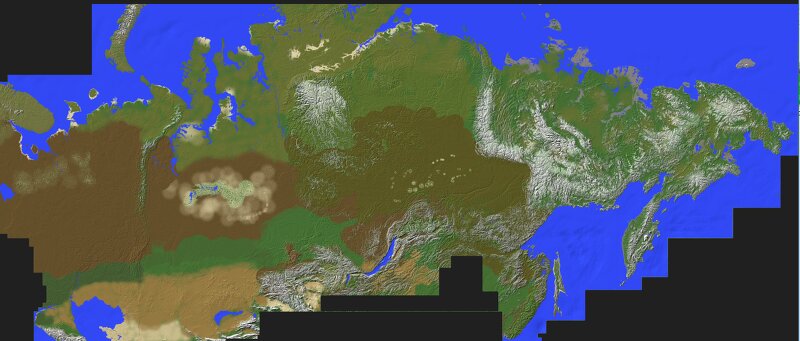
🇷🇺🇰🇿 FREE 26k x 11k Russia + Kazakhstan, Botanically Accurate, Survival Ready, Made By Geoguessr Player 🌏
Creator: aidang62 · 2026-09-06 · Maps · Free on Eaglercraft Studio
Download 🇷🇺🇰🇿 FREE 26k x 11k Russia + Kazakhstan, Botanically Accurate, Sur — free Minecraft map. Created by aidang62. Tagged adventure, immersive, kazakhstan, landscape. Get the world/schematic file when available and explore more free maps on Eaglercraft Studio.
Creator notes
This map consists of Russia Kazakhstan and tiny parts of Mongolia, in which all of their distinct biomes are depicted from soil, native trees, and rock formations. This is a landscaping project, so human elements like buildings and roads are left out. Meant to be hyper-detailed and if you wanna explore Russia + Kazakhstan as it was before settlement. Features several different soil palettes and trees. The map's setting is late summer. Trees: Scots Pine (stripped and unstripped) Silver Birch Aspen Norway Spruce Siberian Pine Siberian Larch Dahurian Larch (stunted variation as well) Schrenk's Spruce Dwarf Birch Erman's Birch Poplar Mongolian Oak Oriental Beech I just noticed a day after that the birches can lose all their leaves due to decay, which can cause massive lag. The only workaround as of now is to set random tick speed to 0. This map is intended to make you feel as if you're there irl, an ambitious explorer . Safe travels! If you like what you see and are interested in real life landscape depictions, check out my other work!
Added value
What’s included on this page
Preview, categories, compatibility, and tools on this page — not a bare file mirror.
- Creator
- aidang62
- Source
- Minecraft downloads library on Eaglercraft Studio
- Type
- Minecraft map / world
- Price
- Free download on Eaglercraft Studio
- Curation
- Listed with credit to aidang62 · studio preview & install guide
- Compatible with
- Minecraft Java (match version / loader in facts)
- Tags
- Adventure, Immersive, Kazakhstan, Landscape, Megaproject, Realworld
Install guide
How to install this free Minecraft map
Eaglercraft Studio map listing with preview, creator credit, and install steps for Java worlds.
- 1Download the world archive (.zip / .mcworld / schematic) when available.
- 2For Java: extract into your .minecraft/saves folder (or import via your launcher).
- 3Launch Minecraft, select the world, and play. Keep a backup before overwriting saves.
Check any version notes in the facts panel — maps often target a specific Minecraft release.
Related free maps
More curated maps from the same library section.

CraftyFoxe · 761 diamonds · 418 views

CraftyFoxe · 761 diamonds · 339 views

CraftyFoxe · 761 diamonds · 319 views

CraftyFoxe · 761 diamonds · 306 views