
3 Portal Pack
Creator: R4ven_x · 2026-09-10 · Maps · Free on Eaglercraft Studio
Download 3 Portal Pack — free Minecraft map. Created by R4ven_x. Tagged architecture, build, download, javaedition. Get the world/schematic file when available and explore more free maps on Eaglercraft Studio.
Creator notes
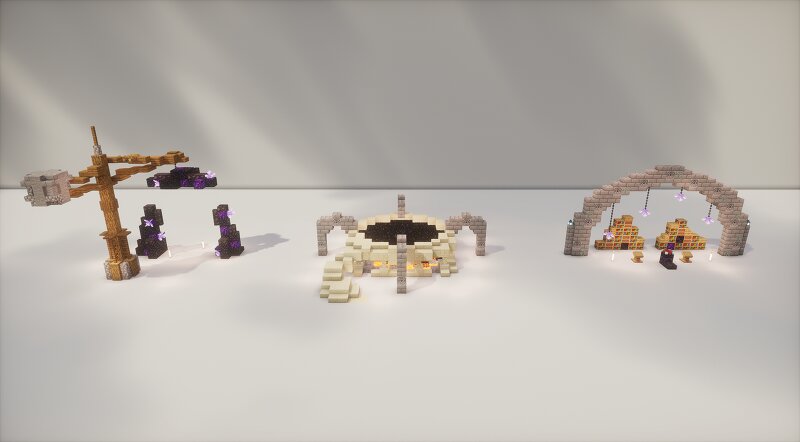
A detailed 3 Portal Pack featuring three unique portal designs, each with its own style and atmosphere. Perfect for adding magical entrances, fantasy landmarks, or mysterious destinations to your Minecraft world. Each portal can be used as a decorative structure or as an entrance to another dimension, dungeon, or hidden area. Features 3 unique detailed portal designs Different styles and shapes Detailed surroundings and decorations Perfect for medieval, fantasy, and adventure builds Ready to paste into your world Compatibility Minecraft Java Edition 1.21.9 Includes .schem files Includes World File Important Note When copying the portals with WorldEdit, use the following commands: //copy -e //perf update off //perf neighbors off //paste -e After pasting, you can turn the performance settings back on according to your preference: //perf update on //perf neighbors on This is important to help prevent blocks such as amethyst from breaking or updating incorrectly during the copy/paste process. Available for Supporter tier and above on my patreon . Thank you for supporting my work! Every download helps me create even more detailed builds for future releases.
Added value
What’s included on this page
Preview, categories, compatibility, and tools on this page — not a bare file mirror.
- Creator
- R4ven_x
- Source
- Minecraft downloads library on Eaglercraft Studio
- Type
- Minecraft map / world
- Price
- Free download on Eaglercraft Studio
- Curation
- Listed with credit to R4ven_x · studio preview & install guide
- Compatible with
- Minecraft Java (match version / loader in facts)
- Tags
- Architecture, Build, Download, Javaedition, Map, Medieval
Install guide
How to install this free Minecraft map
Eaglercraft Studio map listing with preview, creator credit, and install steps for Java worlds.
- 1Download the world archive (.zip / .mcworld / schematic) when available.
- 2For Java: extract into your .minecraft/saves folder (or import via your launcher).
- 3Launch Minecraft, select the world, and play. Keep a backup before overwriting saves.
Check any version notes in the facts panel — maps often target a specific Minecraft release.
Related free maps
More curated maps from the same library section.

CraftyFoxe · 761 diamonds · 418 views

CraftyFoxe · 761 diamonds · 339 views

CraftyFoxe · 761 diamonds · 319 views

CraftyFoxe · 761 diamonds · 306 views