
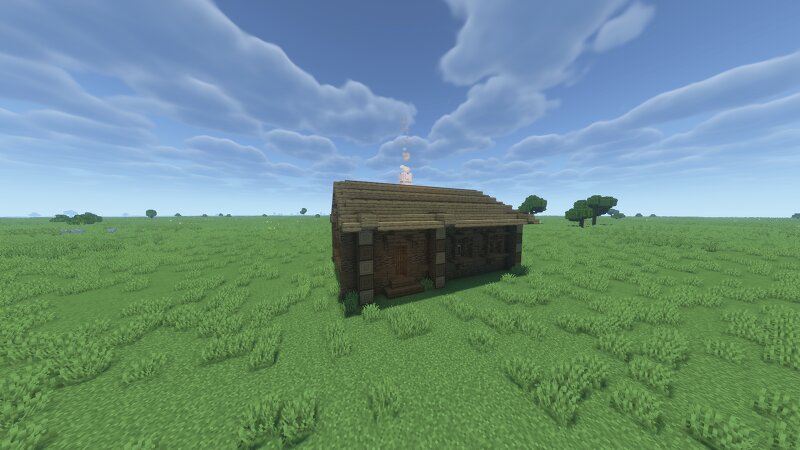
A five‑walled house / Пятистенок
Creator: Petrusha · 2026-09-02 · Maps · Free on Eaglercraft Studio
Download A five‑walled house / Пятистенок — free Minecraft map. Created by Petrusha. Tagged ancientrus, architecture, building, historic. Get the world/schematic file when available and explore more free maps on Eaglercraft Studio.
Creator notes
Пятистенок — деревянный дом в виде прямоугольника, жилая площадь которого разделена поперечной стенкой на две части. В старину это были горница и сени, где горница - чистые помещения избы, а сени - пространство между крыльцом и жилыми комнатами. В жилом помещении устанавливали печь, которая обогревала дом. Здесь же готовили еду. A five‑walled house is a wooden house in the shape of a rectangle, the living space of which is divided into two parts by a transverse wall. In the old days, these were the upper room and the vestibule, where the upper room was the clean part of the house, and the vestibule was the space between the porch and the living rooms. A stove was installed in the living space to heat the house. Food was also prepared there. p.s. Вы можете скачать эту и другие постройки в формате .litematica по ссылке на мой boosty аккаунт. You can download this and other buildings in the .litematica format from the link to my boosty account.
Added value
What’s included on this page
Preview, categories, compatibility, and tools on this page — not a bare file mirror.
- Creator
- Petrusha
- Source
- Minecraft downloads library on Eaglercraft Studio
- Type
- Minecraft map / world
- Price
- Free download on Eaglercraft Studio
- Curation
- Listed with credit to Petrusha · studio preview & install guide
- Compatible with
- Minecraft Java (match version / loader in facts)
- Tags
- Ancientrus, Architecture, Building, Historic, Historical, House
Install guide
How to install this free Minecraft map
Eaglercraft Studio map listing with preview, creator credit, and install steps for Java worlds.
- 1Download the world archive (.zip / .mcworld / schematic) when available.
- 2For Java: extract into your .minecraft/saves folder (or import via your launcher).
- 3Launch Minecraft, select the world, and play. Keep a backup before overwriting saves.
Check any version notes in the facts panel — maps often target a specific Minecraft release.
Related free maps
More curated maps from the same library section.

CraftyFoxe · 761 diamonds · 418 views

CraftyFoxe · 761 diamonds · 339 views

CraftyFoxe · 761 diamonds · 319 views

CraftyFoxe · 761 diamonds · 306 views