
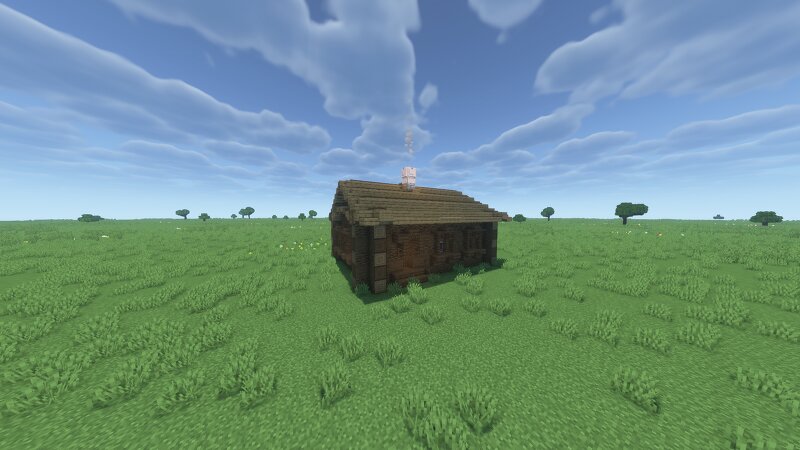
A four-walled hut / Четырёхстенок
Creator: Petrusha · 2026-09-03 · Maps · Free on Eaglercraft Studio
Download A four-walled hut / Четырёхстенок — free Minecraft map. Created by Petrusha. Tagged ancientrus, ancientrussia, architecture, building. Get the world/schematic file when available and explore more free maps on Eaglercraft Studio.
Creator notes
Четырехстенок — первый и старейший тип Русского жилища. За кажущейся примитивностью скрывается удобная и весьма совершенная конструкция жилого дома. Толстые деревянные стены могли укрыть от любого мороза и лютых ветров. Именно четырехстенок представлял из себя рубленную «клеть», простую, но вместе с тем, весьма совершенную конструкцию. The four‑walled house is the first and oldest type of Russian dwelling. Behind its seemingly primitive appearance lies a convenient and highly sophisticated design of a residential house. Thick wooden walls could protect against any frost and fierce winds. The four‑walled house was essentially a log “cabin” — a simple, yet highly sophisticated structure. p.s. Вы можете скачать эту и другие постройки в формате .litematica по ссылке на мой boosty аккаунт. You can download this and other buildings in the .litematica format from the link to my boosty account.
Added value
What’s included on this page
Preview, categories, compatibility, and tools on this page — not a bare file mirror.
- Creator
- Petrusha
- Source
- Minecraft downloads library on Eaglercraft Studio
- Type
- Minecraft map / world
- Price
- Free download on Eaglercraft Studio
- Curation
- Listed with credit to Petrusha · studio preview & install guide
- Compatible with
- Minecraft Java (match version / loader in facts)
- Tags
- Ancientrus, Ancientrussia, Architecture, Building, Historic, Historical
Install guide
How to install this free Minecraft map
Eaglercraft Studio map listing with preview, creator credit, and install steps for Java worlds.
- 1Download the world archive (.zip / .mcworld / schematic) when available.
- 2For Java: extract into your .minecraft/saves folder (or import via your launcher).
- 3Launch Minecraft, select the world, and play. Keep a backup before overwriting saves.
Check any version notes in the facts panel — maps often target a specific Minecraft release.
Related free maps
More curated maps from the same library section.

CraftyFoxe · 761 diamonds · 418 views

CraftyFoxe · 761 diamonds · 339 views

CraftyFoxe · 761 diamonds · 319 views

CraftyFoxe · 761 diamonds · 306 views