
A House Beneath the Wisteria
Creator: samnflounn · 2026-09-12 · Maps · Free on Eaglercraft Studio
Download A House Beneath the Wisteria — free Minecraft map. Created by samnflounn. Tagged building, complex, complexbuildinglandscape, diorama. Get the world/schematic file when available and explore more free maps on Eaglercraft Studio.
Creator notes
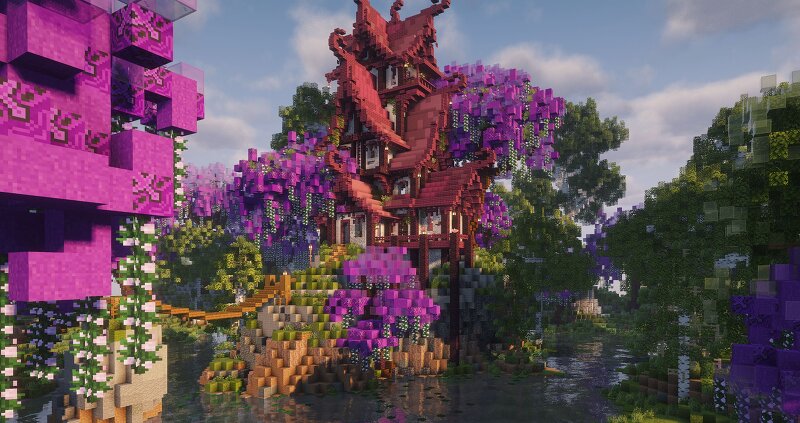
A House Beneath the Wisteria Nestled among a quiet woodland and winding waters, this cozy fantasy home is surrounded by lush greenery and blooming wisteria. A peaceful little corner with warm interiors and plenty of nature to explore. 🌿 PROJECT INTRODUCTION Type: Fantasy House / Diorama Style: Fantasy · Nature · Cozy Version: Minecraft Java 1.21.5+ Dimensions: 160 × 183 × 72 blocks ( X × Z × Y ) Block count: ≈ 467,000 blocks 🏡 ARCHITECTURE / EXTERIOR The house is surrounded by winding waters, woodland paths, lush vegetation, and blooming wisteria, creating a quiet little corner to explore. ● Main house ● Wisteria garden ● Woodland surroundings 🍂 INTERIOR 🌿 Warm interiors, natural materials, and small details give the house a cozy, lived-in feeling while keeping its connection to the surrounding woodland. 🌍 3D PREVIEW 🖼️ PROJECT PRESENTATION A House Beneath the Wisteria 💖 Support & Explore more 🍁 Thank you for visiting 🍁
Added value
What’s included on this page
Preview, categories, compatibility, and tools on this page — not a bare file mirror.
- Creator
- samnflounn
- Source
- Minecraft downloads library on Eaglercraft Studio
- Type
- Minecraft map / world
- Price
- Free download on Eaglercraft Studio
- Curation
- Listed with credit to samnflounn · studio preview & install guide
- Compatible with
- Minecraft Java (match version / loader in facts)
- Tags
- Building, Complex, Complexbuildinglandscape, Diorama, Fantasy, House
Install guide
How to install this free Minecraft map
Eaglercraft Studio map listing with preview, creator credit, and install steps for Java worlds.
- 1Download the world archive (.zip / .mcworld / schematic) when available.
- 2For Java: extract into your .minecraft/saves folder (or import via your launcher).
- 3Launch Minecraft, select the world, and play. Keep a backup before overwriting saves.
Check any version notes in the facts panel — maps often target a specific Minecraft release.
Related free maps
More curated maps from the same library section.

CraftyFoxe · 761 diamonds · 418 views

CraftyFoxe · 761 diamonds · 339 views

CraftyFoxe · 761 diamonds · 319 views

CraftyFoxe · 761 diamonds · 306 views