
Academy Project (Fantasy / Medieval) | JAVA DOWNLOAD 1.21+
Creator: ZIIINGER · 2026-09-13 · Maps · Free on Eaglercraft Studio
Download Academy Project (Fantasy / Medieval) | JAVA DOWNLOAD 1.21+ — free Minecraft map. Created by ZIIINGER. Tagged asset, assets, builds, city. Get the world/schematic file when available and explore more free maps on Eaglercraft Studio.
Creator notes
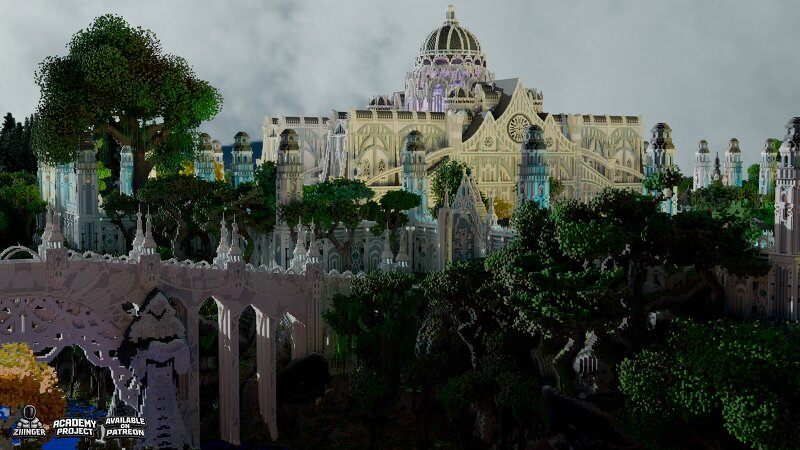
ACADEMY PROJECT Asset's pack Version 1.21+ Academy is a fantasy city hidden among enormous forests and surrounded by a vast, ever-changing natural world. Majestic dragons soar above its rooftops, while enormous floating islands slowly drift across the sky, hiding ancient ruins, temples, and forgotten lands. The city has become a refuge for travelers, mages, merchants, and explorers who come here in search of adventure. Narrow streets wind through stone squares, towering structures rise above the treetops, and ancient bridges connect different parts of the city. Beyond the city walls lies a truly unexplored world — dense forests, abandoned settlements, ancient sanctuaries, mountain peaks, and the territories of mighty dragons. Every corner of this world holds a story waiting to be discovered. High above the ground, entire islands float among the clouds, torn from the earth by an unknown force. Some still hold the remains of an ancient civilization, while others have become homes to rare creatures and dragons. Includes 200 assets to create a fully immersive and living world. The project will continue to expand over time with new assets that fit the theme and bring even more life and
Added value
What’s included on this page
Preview, categories, compatibility, and tools on this page — not a bare file mirror.
- Creator
- ZIIINGER
- Source
- Minecraft downloads library on Eaglercraft Studio
- Type
- Minecraft map / world
- Price
- Free download on Eaglercraft Studio
- Curation
- Listed with credit to ZIIINGER · studio preview & install guide
- Compatible with
- Minecraft Java (match version / loader in facts)
- Tags
- Asset, Assets, Builds, City, Detailing, Download
Install guide
How to install this free Minecraft map
Eaglercraft Studio map listing with preview, creator credit, and install steps for Java worlds.
- 1Download the world archive (.zip / .mcworld / schematic) when available.
- 2For Java: extract into your .minecraft/saves folder (or import via your launcher).
- 3Launch Minecraft, select the world, and play. Keep a backup before overwriting saves.
Check any version notes in the facts panel — maps often target a specific Minecraft release.
Related free maps
More curated maps from the same library section.

CraftyFoxe · 761 diamonds · 418 views

CraftyFoxe · 761 diamonds · 339 views

CraftyFoxe · 761 diamonds · 319 views

CraftyFoxe · 761 diamonds · 306 views