
Aetheria – Village of Air
Creator: TheHighLibrarian · 2026-09-12 · Maps · Free on Eaglercraft Studio
Download Aetheria – Village of Air — free Minecraft map. Created by TheHighLibrarian. Tagged air, cliffs, cozy, fantasy. Get the world/schematic file when available and explore more free maps on Eaglercraft Studio.
Creator notes
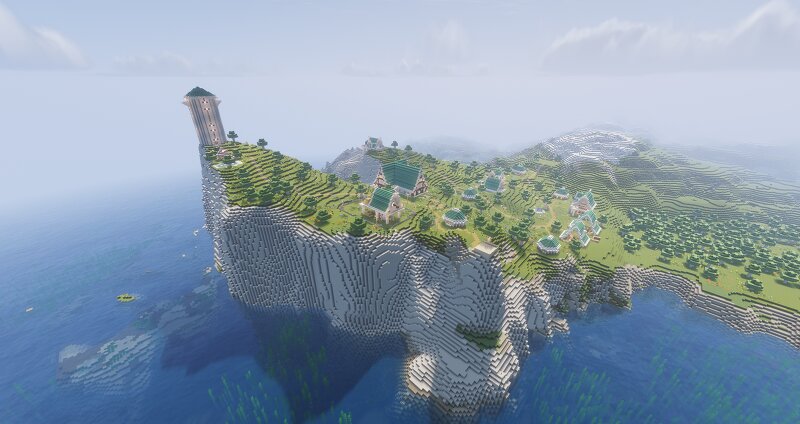
Description (EN): Aetheria, The village of Air is a vanilla survival map built around a peaceful and prosperous fantasy village, a place designed to feel alive, welcoming, and coherent. Wander through its streets, visit the local merchants, explore the houses and buildings, or simply find a quiet corner and enjoy the atmosphere. Every part of the village has been built with the idea of creating a believable settlement where its inhabitants could actually live, work, trade, and spend their days. You can make Aetheria your new home, use the village as the starting point for a survival world, or turn it into the setting for your own stories and roleplay sessions with friends. The map is designed to be fully enjoyable in vanilla, although I recommend playing with the shader Solas shader and Mizunos 16 craft resource pack if you want to experience the atmosphere shown in the screenshots. I hope you enjoy your time in Aetheria! (ES): Aetheria, la aldea del aire, es un mapa survival vanilla construido alrededor de una aldea fantástica, tranquila y próspera, diseñada para sentirse como un lugar vivo, acogedor y coherente. Recorre sus calles, visita a sus comerciantes, explora las casas y e
Added value
What’s included on this page
Preview, categories, compatibility, and tools on this page — not a bare file mirror.
- Creator
- TheHighLibrarian
- Source
- Minecraft downloads library on Eaglercraft Studio
- Type
- Minecraft map / world
- Price
- Free download on Eaglercraft Studio
- Curation
- Listed with credit to TheHighLibrarian · studio preview & install guide
- Compatible with
- Minecraft Java (match version / loader in facts)
- Tags
- Air, Cliffs, Cozy, Fantasy, Peaceful, Start
Install guide
How to install this free Minecraft map
Eaglercraft Studio map listing with preview, creator credit, and install steps for Java worlds.
- 1Download the world archive (.zip / .mcworld / schematic) when available.
- 2For Java: extract into your .minecraft/saves folder (or import via your launcher).
- 3Launch Minecraft, select the world, and play. Keep a backup before overwriting saves.
Check any version notes in the facts panel — maps often target a specific Minecraft release.
Related free maps
More curated maps from the same library section.

CraftyFoxe · 761 diamonds · 418 views

CraftyFoxe · 761 diamonds · 339 views

CraftyFoxe · 761 diamonds · 319 views

CraftyFoxe · 761 diamonds · 306 views