
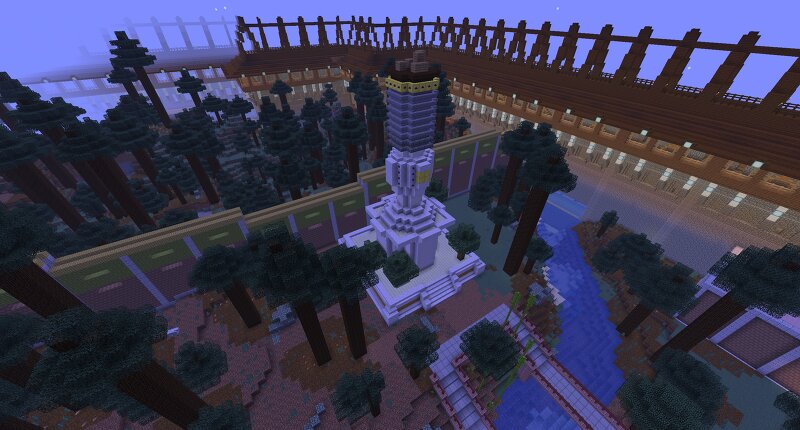
Age of Empires III - Chinese Wonder "White Pagoda"
Creator: misterich · 2026-09-15 · Maps · Free on Eaglercraft Studio
Download Age of Empires III - Chinese Wonder "White Pagoda" — free Minecraft map. Created by misterich. Tagged aoe, aoe3, aoeiii, buddisem. Get the world/schematic file when available and explore more free maps on Eaglercraft Studio.
Creator notes
This a rebuild of the Chinese wonder "White Pagoda" from the game Age of Empires III. It has not interior and was built in yellow team colour. History (Real World): The White Pagoda (known as Baita or part of the Miaoying Temple in Beijing) is one of the oldest and most significant symbols of Tibetan Buddhist architecture in China. The structure has a fascinating history that spans more than 700 years. The Mongolian ruler Kublai Khan, who was the founder of the Yuan Dynasty, ordered the construction in the year 1271 in the capital city of Dadu. He wanted to strengthen the connection between the power of the empire and Tibetan Buddhism. The legendary Nepalese architect and sculptor Arniko (Anige) designed and built this spiritual monument. To this day, the pagoda stands as a symbol of early cultural exchange between China and Nepal. At the end of the Yuan Dynasty, a devastating fire caused by a lightning strike destroyed the entire surrounding temple complex, but only the White Pagoda survived the inferno completely undamaged. In the year 1457, workers erected a new temple around the pagoda, which received the name Miaoying Temple (Temple of Marvelous Response). With a height of aro
Added value
What’s included on this page
Preview, categories, compatibility, and tools on this page — not a bare file mirror.
- Creator
- misterich
- Source
- Minecraft downloads library on Eaglercraft Studio
- Type
- Minecraft map / world
- Price
- Free download on Eaglercraft Studio
- Curation
- Listed with credit to misterich · studio preview & install guide
- Compatible with
- Minecraft Java (match version / loader in facts)
- Tags
- Aoe, Aoe3, Aoeiii, Buddisem, Buddismus, China
Install guide
How to install this free Minecraft map
Eaglercraft Studio map listing with preview, creator credit, and install steps for Java worlds.
- 1Download the world archive (.zip / .mcworld / schematic) when available.
- 2For Java: extract into your .minecraft/saves folder (or import via your launcher).
- 3Launch Minecraft, select the world, and play. Keep a backup before overwriting saves.
Check any version notes in the facts panel — maps often target a specific Minecraft release.
Related free maps
More curated maps from the same library section.

CraftyFoxe · 761 diamonds · 418 views

CraftyFoxe · 761 diamonds · 339 views

CraftyFoxe · 761 diamonds · 319 views

CraftyFoxe · 761 diamonds · 306 views