
Air Balloon Asset Pack | DOWNLOAD
Creator: MineDesigns · 2026-09-27 · Maps · Free on Eaglercraft Studio
Download Air Balloon Asset Pack | DOWNLOAD — free Minecraft map. Created by MineDesigns. Tagged air, asset, awesome, balloon. Get the world/schematic file when available and explore more free maps on Eaglercraft Studio.
Creator notes
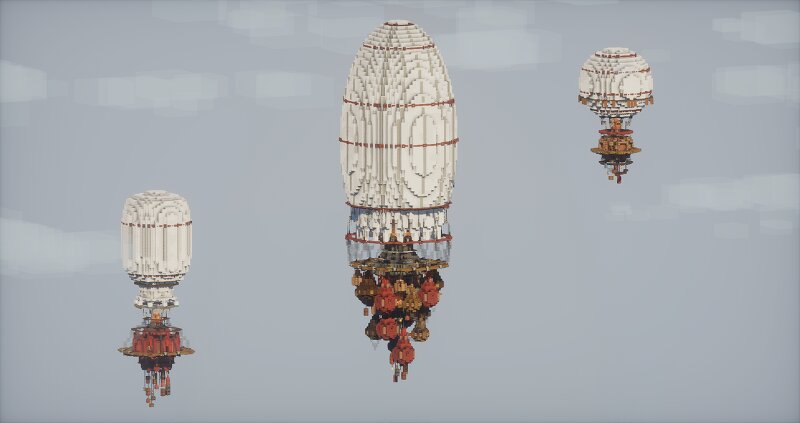
Air Balloon Asset Pack I’ve just finished a new set of three air balloons designed as versatile assets for Minecraft builds. The pack includes three different balloon designs, each with its own shape, colors, and basket details. They can be used to add some extra atmosphere and character to a variety of scenes — from steampunk and Victorian cities to fantasy worlds, floating islands, airship docks, or simply as decorative elements in the sky. The balloons are designed to work well as standalone assets , so you can place them wherever they fit your project and combine them with your own builds. Some more Information: After subscribe, you can download all my maps ! Commercial use is prohibited without the permission of the copyright holder MineDesigns Join my discord Subscribe on YouTube Build your dreams with MineDesigns! Check out my other builds:
Added value
What’s included on this page
Preview, categories, compatibility, and tools on this page — not a bare file mirror.
- Creator
- MineDesigns
- Source
- Minecraft downloads library on Eaglercraft Studio
- Type
- Minecraft map / world
- Price
- Free download on Eaglercraft Studio
- Curation
- Listed with credit to MineDesigns · studio preview & install guide
- Compatible with
- Minecraft Java (match version / loader in facts)
- Tags
- Air, Asset, Awesome, Balloon, Build, Bundle
Install guide
How to install this free Minecraft map
Eaglercraft Studio map listing with preview, creator credit, and install steps for Java worlds.
- 1Download the world archive (.zip / .mcworld / schematic) when available.
- 2For Java: extract into your .minecraft/saves folder (or import via your launcher).
- 3Launch Minecraft, select the world, and play. Keep a backup before overwriting saves.
Check any version notes in the facts panel — maps often target a specific Minecraft release.
Related free maps
More curated maps from the same library section.

CraftyFoxe · 761 diamonds · 418 views

CraftyFoxe · 761 diamonds · 339 views

CraftyFoxe · 761 diamonds · 319 views

CraftyFoxe · 761 diamonds · 306 views