
Alchemy Research Center of the Imperialstonelandian Empire (Imperialstonelandian Lore location) | For Alchemist role
Creator: The Imperialstonelandian Empir · 2026-09-06 · Maps · Free on Eaglercraft Studio
Download Alchemy Research Center of the Imperialstonelandian Empire (Imperialst — free Minecraft map. Created by The Imperialstonelandian Empir. Tagged other. Get the world/schematic file when available and explore more free maps on Eaglercraft Studio.
Creator notes
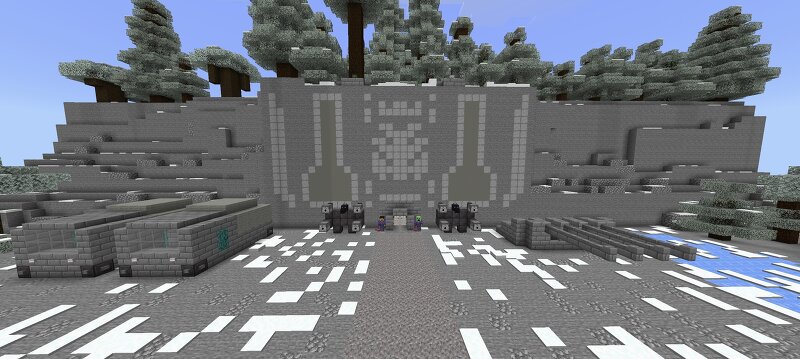
This map represents one of the Achemy Research Centers of the Imperialstonelandian Empire. This research center has long held the role of the Main Alchemy Research Center of the Imperialstonelandian Empire, however, after the alchemy industry of the Empire began to develop and modernize more strongly and the unified Ministry of Science, Magic, and Technology of the Imperistonelandian Empire was created, this center lost its status as the main one. However, despite this, this center was modernized and it is still listed as one of the leading centers of Imperialstonelandian alchemy. This map was created to familiarize people in the group who may in the future join the group as an alchemist role with what alchemy looks like in the Imperialstonelandian lore.
Added value
What’s included on this page
Preview, categories, compatibility, and tools on this page — not a bare file mirror.
- Creator
- The Imperialstonelandian Empir
- Source
- Minecraft downloads library on Eaglercraft Studio
- Type
- Minecraft map / world
- Price
- Free download on Eaglercraft Studio
- Curation
- Listed with credit to The Imperialstonelandian Empir · studio preview & install guide
- Compatible with
- Minecraft Java (match version / loader in facts)
- Tags
- Other
Install guide
How to install this free Minecraft map
Eaglercraft Studio map listing with preview, creator credit, and install steps for Java worlds.
- 1Download the world archive (.zip / .mcworld / schematic) when available.
- 2For Java: extract into your .minecraft/saves folder (or import via your launcher).
- 3Launch Minecraft, select the world, and play. Keep a backup before overwriting saves.
Check any version notes in the facts panel — maps often target a specific Minecraft release.
Related free maps
More curated maps from the same library section.

CraftyFoxe · 761 diamonds · 418 views

CraftyFoxe · 761 diamonds · 339 views

CraftyFoxe · 761 diamonds · 319 views

CraftyFoxe · 761 diamonds · 306 views