
Among US! Mira HQ – MAP in MINECRAFT (Java and Bedrock)
Creator: DanMinecraft9M · 2026-08-31 · Maps · Free on Eaglercraft Studio
Download Among US! Mira HQ – MAP in MINECRAFT (Java and Bedrock) — free Minecraft map. Created by DanMinecraft9M. Tagged amongus, amongusminecraft, games, mirahq. Get the world/schematic file when available and explore more free maps on Eaglercraft Studio.
Creator notes
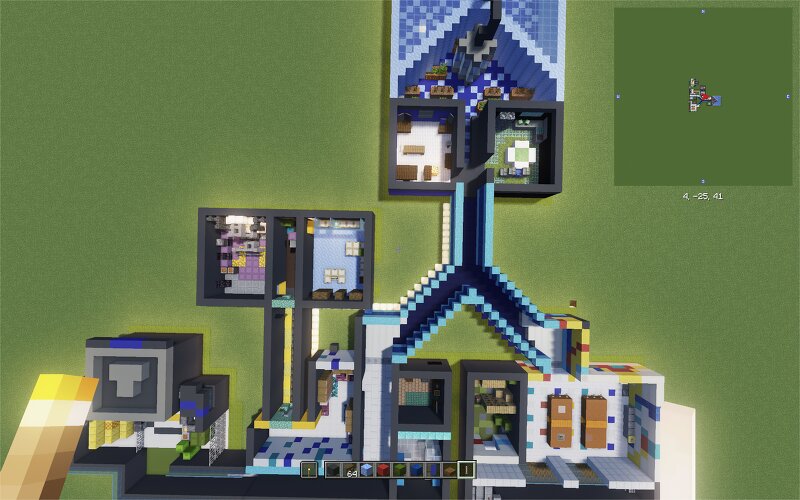
I'd like to present a pretty accurate recreation of my favorite Among Us map: MIRA HQ! I finally finished it. I started building it three years ago, but then, as often happens, I didn't open Minecraft for more than two years. A few days ago I remembered all of my worlds and decided it was finally time to complete this one. I recreated the map with a lot of passion, and I really hope you'll enjoy it. I promise that if you've ever played on MIRA HQ in Among Us, you'll get a strong sense of déjà vu—as if you've already walked through this map in Minecraft before. If anyone would like to create the ventilation system (with command blocks or without), feel free to message me! I'd be happy to publish a version of the map with fully working vents. P.S. Sorry about the floating bastions. They're just artifacts from converting the world from Minecraft Bedrock Edition to Java Edition.
Added value
What’s included on this page
Preview, categories, compatibility, and tools on this page — not a bare file mirror.
- Creator
- DanMinecraft9M
- Source
- Minecraft downloads library on Eaglercraft Studio
- Type
- Minecraft map / world
- Price
- Free download on Eaglercraft Studio
- Curation
- Listed with credit to DanMinecraft9M · studio preview & install guide
- Compatible with
- Minecraft Java (match version / loader in facts)
- Tags
- Amongus, Amongusminecraft, Games, Mirahq, Other
Install guide
How to install this free Minecraft map
Eaglercraft Studio map listing with preview, creator credit, and install steps for Java worlds.
- 1Download the world archive (.zip / .mcworld / schematic) when available.
- 2For Java: extract into your .minecraft/saves folder (or import via your launcher).
- 3Launch Minecraft, select the world, and play. Keep a backup before overwriting saves.
Check any version notes in the facts panel — maps often target a specific Minecraft release.
Related free maps
More curated maps from the same library section.

CraftyFoxe · 761 diamonds · 418 views

CraftyFoxe · 761 diamonds · 339 views

CraftyFoxe · 761 diamonds · 319 views

CraftyFoxe · 761 diamonds · 306 views