
ASSETS PALM
Creator: Ekavane_build · 2026-09-10 · Maps · Free on Eaglercraft Studio
Download ASSETS PALM — free Minecraft map. Created by Ekavane_build. Tagged other. Get the world/schematic file when available and explore more free maps on Eaglercraft Studio.
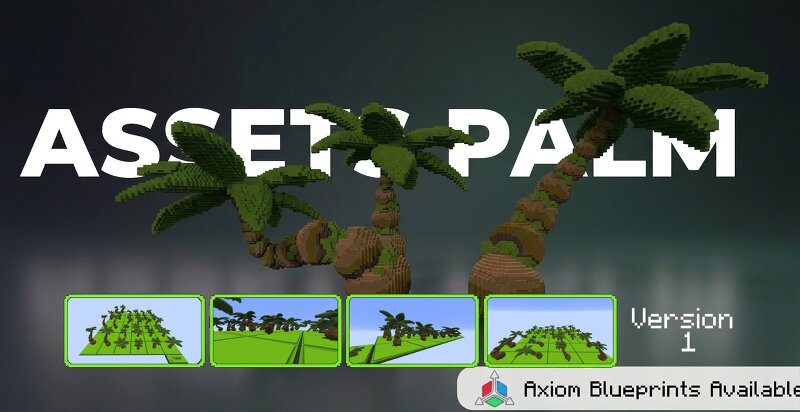
Creator notes
🌴 Palm Assets v1.0 (DEMO GRATUITA) Assets de palmeras de alta calidad para tus construcciones de Minecraft Dale más detalle, profundidad y atmósfera tropical a tus entornos de Minecraft con una colección de palmeras cuidadosamente diseñadas, listas para colocar directamente en tus mapas. Ideal para lobbies, spawns, terrenos, mapas, islas, playas, paisajes y entornos personalizados. 🎁 ¿QUÉ INCLUYE ESTA DEMO? Esta publicación contiene la VERSIÓN DEMO GRATUITA para que puedas probar la calidad del paquete directamente en tu juego. 🌴 Muestra de assets de palmeras 📁 Archivos .schem 🔷 Axiom Blueprints ⭐ CONSIGUE LA VERSIÓN PREMIUM (COMPLETA) ¿Quieres la colección completa con todas las variaciones? Obtén acceso completo al paquete completo en BuildByBit o solicita la versión premium directamente en nuestro Discord. discord.com/invite/WTCurNQEBa Premium version 🔄 Futuras Actualizaciones Versión 1 de 3 Esta es la primera versión del pack Palm Assets, con 3 actualizaciones en total planificadas. Al adquirir la versión Premium, recibirás todas las futuras actualizaciones completamente GRATIS. Cada actualización incluirá: 🌴 Nuevos diseños de palmeras 🌴 Nuevas variaciones 🌴 Diferentes formas y
Added value
What’s included on this page
Preview, categories, compatibility, and tools on this page — not a bare file mirror.
- Creator
- Ekavane_build
- Source
- Minecraft downloads library on Eaglercraft Studio
- Type
- Minecraft map / world
- Price
- Free download on Eaglercraft Studio
- Curation
- Listed with credit to Ekavane_build · studio preview & install guide
- Compatible with
- Minecraft Java (match version / loader in facts)
- Tags
- Other
Install guide
How to install this free Minecraft map
Eaglercraft Studio map listing with preview, creator credit, and install steps for Java worlds.
- 1Download the world archive (.zip / .mcworld / schematic) when available.
- 2For Java: extract into your .minecraft/saves folder (or import via your launcher).
- 3Launch Minecraft, select the world, and play. Keep a backup before overwriting saves.
Check any version notes in the facts panel — maps often target a specific Minecraft release.
Related free maps
More curated maps from the same library section.

CraftyFoxe · 761 diamonds · 418 views

CraftyFoxe · 761 diamonds · 339 views

CraftyFoxe · 761 diamonds · 319 views

CraftyFoxe · 761 diamonds · 306 views