
💧 Azure Water Tower | Free Download
Creator: EcoSMP · 2026-09-07 · Maps · Free on Eaglercraft Studio
Download 💧 Azure Water Tower | Free Download — free Minecraft map. Created by EcoSMP. Tagged amazing, awesome, azure, base. Get the world/schematic file when available and explore more free maps on Eaglercraft Studio.
Creator notes
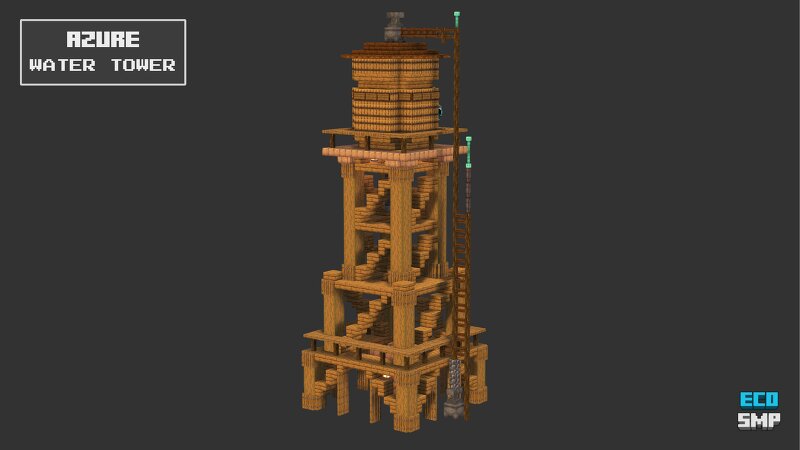
A water tower from Azure Village, with an elevated tank supported by an open timber framework. If you like this build, please give it a diamond above 💙 📥 Free Downloads & Guides: .schem, .litematic, .mcstructure, and .nbt files Interactive 2D/3D browser guide Build Instructions PDF & SVG with 2D/3D layer-by-layer views and a materials list Materials list .txt file Only the .schem is here on PMC. The remaining files are available for free on Patreon . For those interested, Build Benefactor includes over 100 builds and grants unlimited access to our growing collection! 📃 Licensing: Our free builds are licensed under the Creative Commons Attribution-NonCommercial-ShareAlike 4.0 International License. You're free to use and modify them, but you must give credit to EcoSMP and must not redistribute the files or use the builds for commercial purposes—more details at: creativecommons.org/licenses/by-nc-sa/4.0/
Added value
What’s included on this page
Preview, categories, compatibility, and tools on this page — not a bare file mirror.
- Creator
- EcoSMP
- Source
- Minecraft downloads library on Eaglercraft Studio
- Type
- Minecraft map / world
- Price
- Free download on Eaglercraft Studio
- Curation
- Listed with credit to EcoSMP · studio preview & install guide
- Compatible with
- Minecraft Java (match version / loader in facts)
- Tags
- Amazing, Awesome, Azure, Base, Blueprint, Build
Install guide
How to install this free Minecraft map
Eaglercraft Studio map listing with preview, creator credit, and install steps for Java worlds.
- 1Download the world archive (.zip / .mcworld / schematic) when available.
- 2For Java: extract into your .minecraft/saves folder (or import via your launcher).
- 3Launch Minecraft, select the world, and play. Keep a backup before overwriting saves.
Check any version notes in the facts panel — maps often target a specific Minecraft release.
Related free maps
More curated maps from the same library section.

CraftyFoxe · 761 diamonds · 418 views

CraftyFoxe · 761 diamonds · 339 views

CraftyFoxe · 761 diamonds · 319 views

CraftyFoxe · 761 diamonds · 306 views