
Block City: Battle Royale OG Season 1
Creator: soyalans · 2026-09-04 · Maps · Free on Eaglercraft Studio
Download Block City: Battle Royale OG Season 1 — free Minecraft map. Created by soyalans. Tagged other. Get the world/schematic file when available and explore more free maps on Eaglercraft Studio.
Creator notes
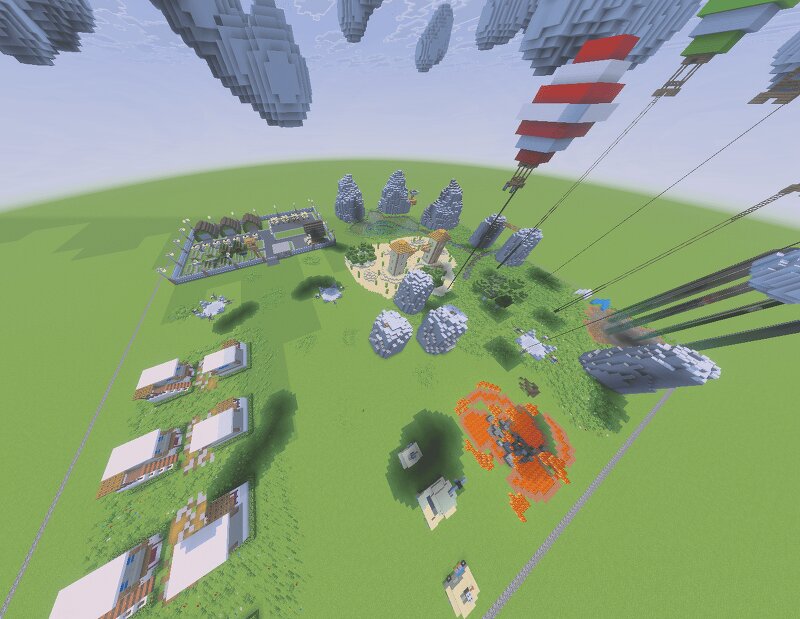
English: Step into an action-packed 200x200x100 battle royale map built for fast-paced, fun, and replayable matches! Block City: Battle Royale (OG Edition) brings back the original Season 1: War theme, fully upgraded with the Reload UI and randomized mechanics from the reBlock City: Battle Royale series. Players drop straight from the center of the map, choosing their landing spot wisely to gear up quickly. Scattered across the area are randomized loot chests, making every game feel fresh and unpredictable. The map includes key points of interest like the Military Base and high-flying Hot Air Balloons packed with Elytras, alongside a varied arsenal of weapons, tiered armor sets, and signature special items: Goat Horns -> carry ONE in your inventory (not in the hotbar) to gain powerful status effects like Strength, Speed, Jump Boost, Resistance, or Haste. (Carrying duplicates of the same horn will disable the effect, but you can carry different ones!) Terminator & Special Weapons -> hunt down legendary gear scattered in chests or fixed points around the map to turn the tide of battle. With the return of this iconic Season 1 and its classic warfare theme, combined with signature Powe
Added value
What’s included on this page
Preview, categories, compatibility, and tools on this page — not a bare file mirror.
- Creator
- soyalans
- Source
- Minecraft downloads library on Eaglercraft Studio
- Type
- Minecraft map / world
- Price
- Free download on Eaglercraft Studio
- Curation
- Listed with credit to soyalans · studio preview & install guide
- Compatible with
- Minecraft Java (match version / loader in facts)
- Tags
- Other
Install guide
How to install this free Minecraft map
Eaglercraft Studio map listing with preview, creator credit, and install steps for Java worlds.
- 1Download the world archive (.zip / .mcworld / schematic) when available.
- 2For Java: extract into your .minecraft/saves folder (or import via your launcher).
- 3Launch Minecraft, select the world, and play. Keep a backup before overwriting saves.
Check any version notes in the facts panel — maps often target a specific Minecraft release.
Related free maps
More curated maps from the same library section.

CraftyFoxe · 761 diamonds · 418 views

CraftyFoxe · 761 diamonds · 339 views

CraftyFoxe · 761 diamonds · 319 views

CraftyFoxe · 761 diamonds · 306 views