
Blockholm Museum!
Creator: BSLBuilds · 2026-09-28 · Maps · Free on Eaglercraft Studio
Download Blockholm Museum! — free Minecraft map. Created by BSLBuilds. Tagged exterior, interior, land structure, modernmuseum. Get the world/schematic file when available and explore more free maps on Eaglercraft Studio.
Creator notes
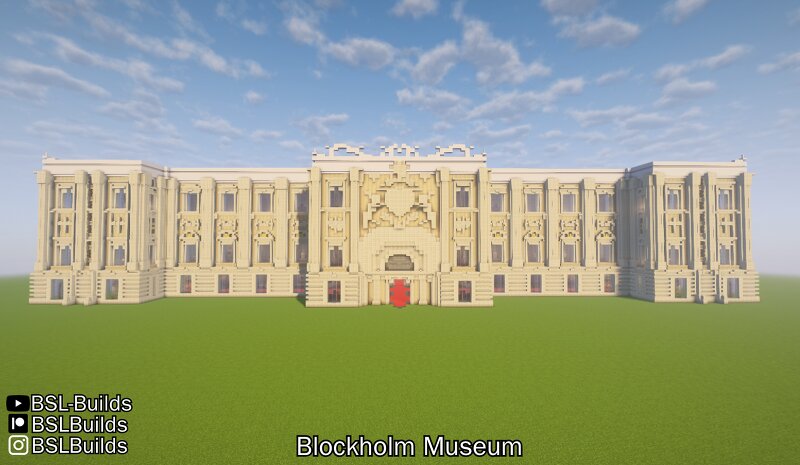
Hello! This was one of my projects mentioned in my First Poll patreon post. The idea of this building is having a modern museum with an darker chamber inside such as a cinema room-- Building is entirely bright, however, there is the inner museum chamber in the middle of it, bringing dark colors and drawing total attention towards the building. This building is 100% SURVIVAL FRIENDLY and does not include armor stands, item frames, custom heads, command and creative mode-only blocks. However, light blocks were used for the infront of the building image, at the last image . The Blockholm Museum is inspired in " Swedish Parliament House(Sveriges riksdagshus) " in Stockholm , Sweden . There are a total of 340 exhibit spots in the building. There are 4 floors: The 1st floor includes entrances for the Inner Museum area, receptions, an library wing, few exhibit areas, and staircases for the 2nd floor. The 2nd floor includes a massive exhibit area, reception, and staircases for the 3rd floor. The 3rd floor includes 40 different empty rooms! 19 of these rooms have access to outside windows. Rooms tend to have different shapes. The 4th floor is the terrace. • This project may be downloaded in
Added value
What’s included on this page
Preview, categories, compatibility, and tools on this page — not a bare file mirror.
- Creator
- BSLBuilds
- Source
- Minecraft downloads library on Eaglercraft Studio
- Type
- Minecraft map / world
- Price
- Free download on Eaglercraft Studio
- Curation
- Listed with credit to BSLBuilds · studio preview & install guide
- Compatible with
- Minecraft Java (match version / loader in facts)
- Tags
- Exterior, Interior, Land Structure, Modernmuseum, Museum, Stockholm
Install guide
How to install this free Minecraft map
Eaglercraft Studio map listing with preview, creator credit, and install steps for Java worlds.
- 1Download the world archive (.zip / .mcworld / schematic) when available.
- 2For Java: extract into your .minecraft/saves folder (or import via your launcher).
- 3Launch Minecraft, select the world, and play. Keep a backup before overwriting saves.
Check any version notes in the facts panel — maps often target a specific Minecraft release.
Related free maps
More curated maps from the same library section.

CraftyFoxe · 761 diamonds · 418 views

CraftyFoxe · 761 diamonds · 339 views

CraftyFoxe · 761 diamonds · 319 views

CraftyFoxe · 761 diamonds · 306 views