
Castle
Creator: Lawan_18 · 2026-09-08 · Maps · Free on Eaglercraft Studio
Download Castle — free Minecraft map. Created by Lawan_18. Tagged other. Get the world/schematic file when available and explore more free maps on Eaglercraft Studio.
Creator notes
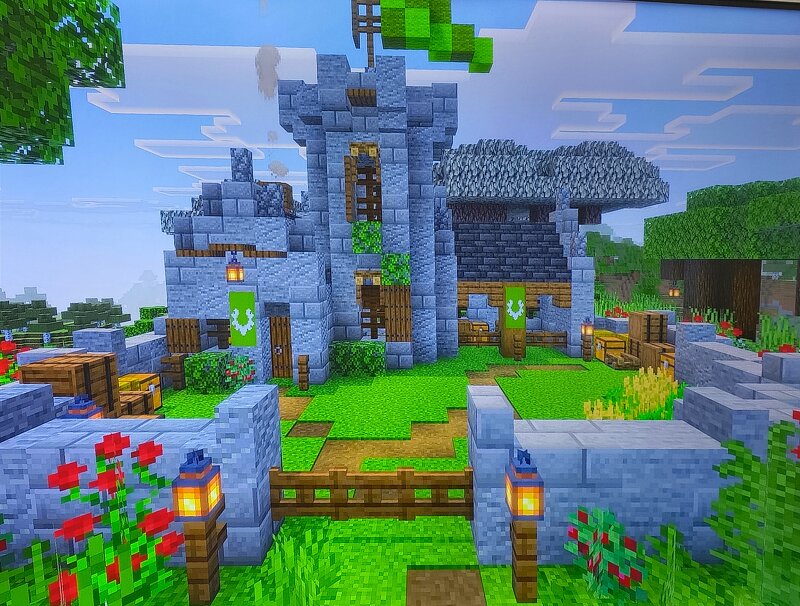
Hello everyone and welcome to our brand new Minecraft map creation! Today, we are super excited to share our latest hard work with the entire community. Built carefully on Bedrock Edition, this project features three entirely different and unique medieval castles that we spent a lot of time designing and perfecting. Each castle has its own style, ranging from detailed stone walls, cozy courtyard areas decorated with custom green banners, to tall watchtowers overlooking the landscape. One of the absolute highlights of this build is a massive stone fortress surrounded by stunning pink Cherry Blossom trees, which creates an amazing contrast during the day. Furthermore, the entire area looks absolutely magical at night with carefully placed lanterns and glowing light sources that bring the structures to life. My dear best friend and I worked together on every single block to make sure the attention to detail is top-notch. We truly hope you all enjoy exploring these builds as much as we enjoyed creating them. We are constantly working on even bigger and better projects, so make sure to stay tuned for future updates! Please let us know what you think in the comments below!
Added value
What’s included on this page
Preview, categories, compatibility, and tools on this page — not a bare file mirror.
- Creator
- Lawan_18
- Source
- Minecraft downloads library on Eaglercraft Studio
- Type
- Minecraft map / world
- Price
- Free download on Eaglercraft Studio
- Curation
- Listed with credit to Lawan_18 · studio preview & install guide
- Compatible with
- Minecraft Java (match version / loader in facts)
- Tags
- Other
Install guide
How to install this free Minecraft map
Eaglercraft Studio map listing with preview, creator credit, and install steps for Java worlds.
- 1Download the world archive (.zip / .mcworld / schematic) when available.
- 2For Java: extract into your .minecraft/saves folder (or import via your launcher).
- 3Launch Minecraft, select the world, and play. Keep a backup before overwriting saves.
Check any version notes in the facts panel — maps often target a specific Minecraft release.
Related free maps
More curated maps from the same library section.

CraftyFoxe · 761 diamonds · 418 views

CraftyFoxe · 761 diamonds · 339 views

CraftyFoxe · 761 diamonds · 319 views

CraftyFoxe · 761 diamonds · 306 views