
Cathedral of Our Lady of Refuge (2019)
Creator: creeper5777 · 2026-09-24 · Maps · Free on Eaglercraft Studio
Download Cathedral of Our Lady of Refuge (2019) — free Minecraft map. Created by creeper5777. Tagged architecture, athion, cathedral, complex. Get the world/schematic file when available and explore more free maps on Eaglercraft Studio.
Creator notes
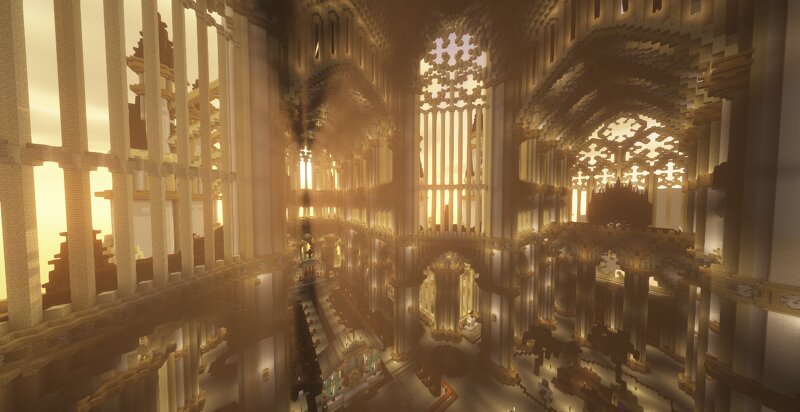
Hello! This is a project I built back in 2018-19 on the Athion network on version 1.12 (so very limited block choices, lol), and contributed to me gaining the rank of Grand Creator, only the 4th person to do so at the time (and only one other has done it since). The build is a double-transept, 3-tower cathedral taking inspiration from Reims, Ely, Amiens, and others. It was built entirely without cobblestone wall and largely without fence, as I wanted to see if it was still possible to make a good church without these blocks (as the meta at the time discouraged using these blocks). It was envisioned as having been built over multiple campaigns, which explains the change in palette and detailing. It takes up most of a ~300x600 plot, and used the whole height limit (at the time, before it was increased). This build is not indicative of my current skill level, which is vastly improved now. Enjoy :) Also, sorry for lack of images… I’ll try to grab more next time. More builds coming soon :)
Added value
What’s included on this page
Preview, categories, compatibility, and tools on this page — not a bare file mirror.
- Creator
- creeper5777
- Source
- Minecraft downloads library on Eaglercraft Studio
- Type
- Minecraft map / world
- Price
- Free download on Eaglercraft Studio
- Curation
- Listed with credit to creeper5777 · studio preview & install guide
- Compatible with
- Minecraft Java (match version / loader in facts)
- Tags
- Architecture, Athion, Cathedral, Complex, Gothic, Interior
Install guide
How to install this free Minecraft map
Eaglercraft Studio map listing with preview, creator credit, and install steps for Java worlds.
- 1Download the world archive (.zip / .mcworld / schematic) when available.
- 2For Java: extract into your .minecraft/saves folder (or import via your launcher).
- 3Launch Minecraft, select the world, and play. Keep a backup before overwriting saves.
Check any version notes in the facts panel — maps often target a specific Minecraft release.
Related free maps
More curated maps from the same library section.

CraftyFoxe · 761 diamonds · 418 views

CraftyFoxe · 761 diamonds · 339 views

CraftyFoxe · 761 diamonds · 319 views

CraftyFoxe · 761 diamonds · 306 views