
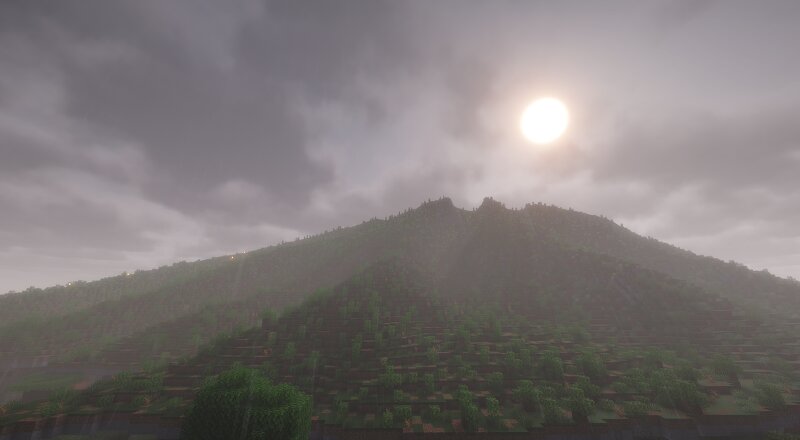
Cerro de la Silla, Monterrey (Saddle Mountain)
Creator: kikepz · 2026-09-05 · Maps · Free on Eaglercraft Studio
Download Cerro de la Silla, Monterrey (Saddle Mountain) — free Minecraft map. Created by kikepz. Tagged land structure. Get the world/schematic file when available and explore more free maps on Eaglercraft Studio.
Creator notes
El Cerro de la Silla de Monterrey, reconstruido desde datos reales de elevación. Esta no es una montaña inspirada en el cerro: es el cerro. Los senderos también son reales. Nota sobre el tiempo de carga: es normal que la carga tarde varios segundos (incluso más de un minuto según el servidor). Es una estructura muy grande: 657 x 664 bloques de huella y 101 de alto (~44 millones de celdas de región, ~1.23 millones de bloques sólidos). No canceles el comando ni salgas del mundo mientras pega; el interior hueco ya reduce el trabajo al mínimo posible. === The Cerro de la Silla (Saddle Mountain) of Monterrey, Mexico — rebuilt from real elevation data. This is not a mountain "inspired by" the real one: it IS the real one. The hiking trails are real too. Loading note: it is normal for loading to take several seconds — even over a minute depending on your server. This is a very large structure: 657 x 664 blocks footprint and 101 tall (~44 million region cells, ~1.23 million solid blocks). Don't cancel the command or leave the world while it pastes; the hollow interior already keeps the work as light as possible.
Added value
What’s included on this page
Preview, categories, compatibility, and tools on this page — not a bare file mirror.
- Creator
- kikepz
- Source
- Minecraft downloads library on Eaglercraft Studio
- Type
- Minecraft map / world
- Price
- Free download on Eaglercraft Studio
- Curation
- Listed with credit to kikepz · studio preview & install guide
- Compatible with
- Minecraft Java (match version / loader in facts)
- Tags
- Land Structure
Install guide
How to install this free Minecraft map
Eaglercraft Studio map listing with preview, creator credit, and install steps for Java worlds.
- 1Download the world archive (.zip / .mcworld / schematic) when available.
- 2For Java: extract into your .minecraft/saves folder (or import via your launcher).
- 3Launch Minecraft, select the world, and play. Keep a backup before overwriting saves.
Check any version notes in the facts panel — maps often target a specific Minecraft release.
Related free maps
More curated maps from the same library section.

CraftyFoxe · 761 diamonds · 418 views

CraftyFoxe · 761 diamonds · 339 views

CraftyFoxe · 761 diamonds · 319 views

CraftyFoxe · 761 diamonds · 306 views