
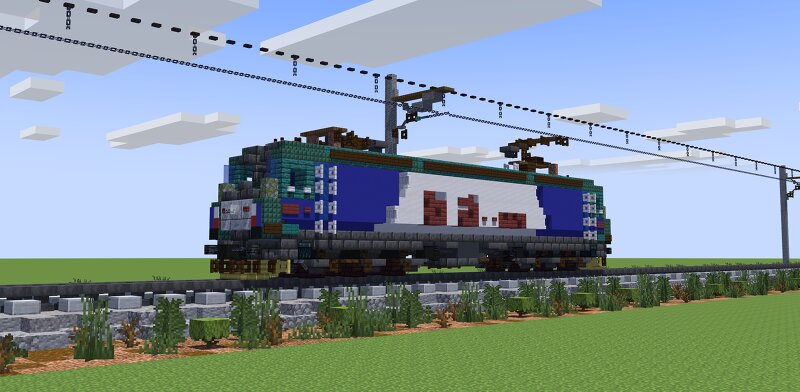
China Railway HXD3C Electric Locomotive | 1.5:1 Scale
Creator: Eu_Reedy · 2026-09-17 · Maps · Free on Eaglercraft Studio
Download China Railway HXD3C Electric Locomotive | 1.5:1 Scale — free Minecraft map. Created by Eu_Reedy. Tagged other. Get the world/schematic file when available and explore more free maps on Eaglercraft Studio.
Creator notes
HXD3C electric locomotive is an AC-drive, six-axle, 7,200 kW mainline electric locomotive developed on the basis of the HXD3 and HXD3B electric locomotives, suitable for both passenger and freight transport. It is the first passenger-service model in the "HX" series of AC-drive electric locomotives, and also the mainline passenger electric locomotive with the largest fleet in China Railway. It features strong adaptability, relatively high reliability, fast starting acceleration, high tractive effort, and a wide constant-power range. · Type: Electric locomotive · Country of origin: China · Manufacturer: Dalian Locomotive & Rolling Stock Works · Years of production: 2010–2014 · Total produced: More than 2,300 units · Primary operator: China State Railway Group Co., Ltd. · Maximum operating speed: 120 km/h · Service weight: 138 t · Traction power: 7,200 kW · Tractive effort: 520 kN
Added value
What’s included on this page
Preview, categories, compatibility, and tools on this page — not a bare file mirror.
- Creator
- Eu_Reedy
- Source
- Minecraft downloads library on Eaglercraft Studio
- Type
- Minecraft map / world
- Price
- Free download on Eaglercraft Studio
- Curation
- Listed with credit to Eu_Reedy · studio preview & install guide
- Compatible with
- Minecraft Java (match version / loader in facts)
- Tags
- Other
Install guide
How to install this free Minecraft map
Eaglercraft Studio map listing with preview, creator credit, and install steps for Java worlds.
- 1Download the world archive (.zip / .mcworld / schematic) when available.
- 2For Java: extract into your .minecraft/saves folder (or import via your launcher).
- 3Launch Minecraft, select the world, and play. Keep a backup before overwriting saves.
Check any version notes in the facts panel — maps often target a specific Minecraft release.
Related free maps
More curated maps from the same library section.

CraftyFoxe · 761 diamonds · 418 views

CraftyFoxe · 761 diamonds · 339 views

CraftyFoxe · 761 diamonds · 319 views

CraftyFoxe · 761 diamonds · 306 views